

Leaderboard
-
SnowyLessy
Members2Points6Posts -
JeffB
Members1Points101Posts -
Mohit Thapa
Enpass team member1Points69Posts



Popular Content
Showing content with the highest reputation on 01/23/24 in all areas
-
Sure, let me ask the team to have a look at this. #SI-36361 point
-
1 point
-
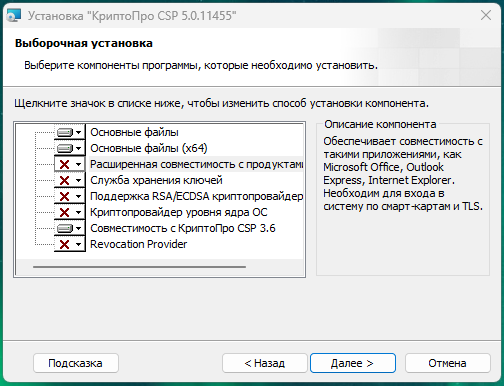
The Cryptopro module "improved compatibility with Microsoft products" breaks the CURL utility. Enpass uses that utility for sending requests to web services eg: activation/vault sync/pass check etc. so you need to fully remove cryptopro or just that concrete module for back enpass to live. My personal choise is move cryptopro inside VM --- FOR RUSSIAN USERS Модуль криптопро "Расширенная совместимость с продуктами Microsoft" что-то ломает внутри системы и перестает работать CURL, enpass делает запросы в сеть именно через этот пакет. Если отключить модуль не удаляя криптопро, все начинает работать, мне этот модуль требуется и я решила проблему радикально, полностью удалив криптопро из системы и установив его в hyper-v VM на этом же компьютере. --- This post is the result of a long history of debugging on this topic, and I decided to highlight this case as a more specific issue related to incompatibility and probably a specific country.
 1 point
 -
The DDG browser has improved and now easily uses Enpass security without needed to switch to the Enpass keyboard.1 point