


Manish Chokwal
Enpass team member
-
Joined
Everything posted by Manish Chokwal
-
Hi @Björn, Welcome to the Enpass Community Forum. I appreciate your efforts in reporting the presence of this issue. I have shared it all with the concerned team for further investigation. In the meantime, please share the details of the Enpass version.
-
Hi @Masterframe, I appreciate you for being patient with us. Our team has reproduced this issue and working on fixing it. Its fix can be seen in future versions. In the meantime, we highly appreciate your patience and cooperation.
-
Hi @logi, I appreciate your efforts in reporting the presence of this issue. We already have a FAQ regarding this issue. I would suggest you visit it and let me know if that helps.
-
Hi @jakobg, I appreciate your response and I have shared it all with the concerned team for further investigation. In the meantime, your patience is highly appreciated here. SI-2989
-
Hi @jakobg, Welcome to the Enpass Community Forum. I certainly understand your concern about not being able to Wi-Fi sync your data on Windows desktop to mobile devices. In order to assist you better, please help me with the following details: Share the details of the Enpass version on your desktop, android, and iOS mobile. Did you install Enpass from a store or our official website on the desktop? Visit the following links about Wi-Fi sync setup, manual setup, and troubleshooting.
-
Hi @Niesfisch, Thank you for reporting the presence of this issue. I have shared it with the concerned team for further investigation. In the meantime, your patience is highly appreciated here. SI-2982
-
Hi @Luis D., Welcome to the Enpass Community Forum. I certainly understand your concern about being unable to sync with DropBox via the Iron browser. In order to assist you better, please help me with the following details: Let me know your default browser and it's version details. If you are not using Chrome/Firefox as default browser, please make them default and share your findings. Share the details of Enpass version.
-
Hi @Ivarson, I appreciate your response. We have recently released another version 6.8.2 for Windows. Please try that and let me know if that works fine. Otherwise, please help me with the following details: Share the number of items, vaults, and attachments in your Enpass. Help me with the cloud sync accounts. Please confirm if you are using Windows 10 or 11.
-
-
Hi @Idoki, Thank you for the response. I have shared all the details with the concerned team for further investigation. In the meantime, your patience is highly appreciated here. SI-2959
-
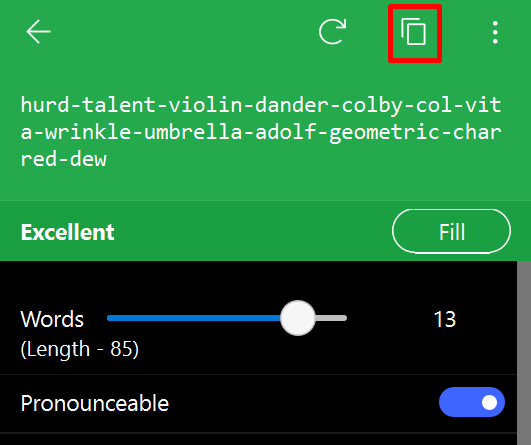
Hi @Sky, Welcome to the Enpass Community Forum. I appreciate your efforts in reporting the presence of this issue. It could be a website-specific issue as Enpass fills both fields. In order to assist you better, please share the URL of the website where you have experienced this issue. Enpass does not automatically copy or fill the generated password, it has to be selected manually. In addition, the "Fill button" will fill the password field but does not copy it to the clipboard. For that, we have a separate option "Fill and Copy" by clicking on the three dots(Top-Right corner of the password generator). Furthermore, we already have the copy button(As shown in the screenshot).
-
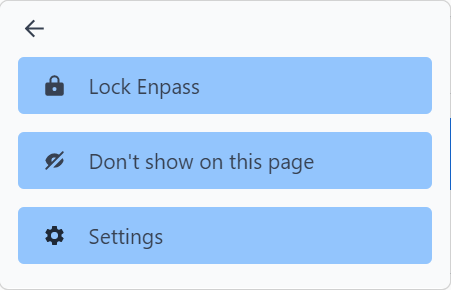
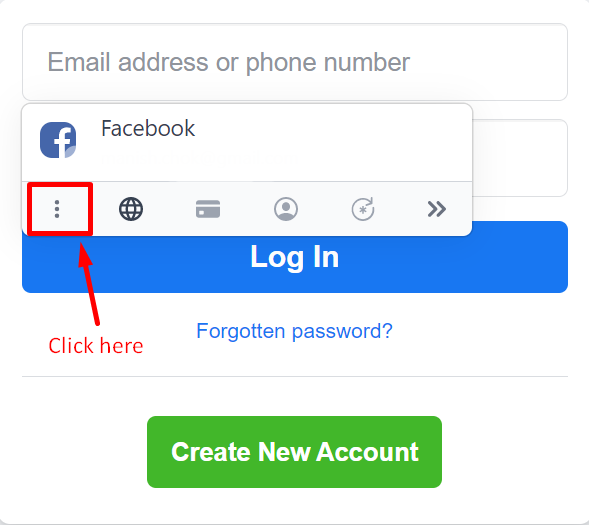
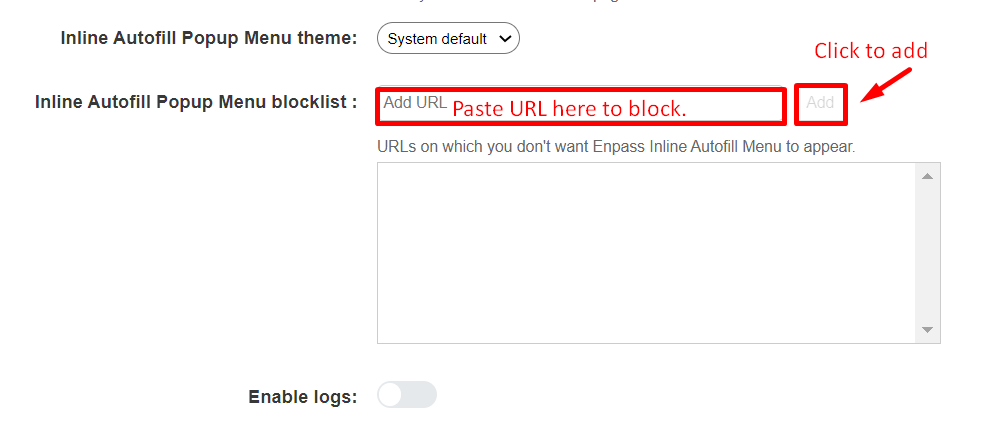
Hi @trebory6, It is possible to disable the Enpass extension on a specific website and following are the two ways to do it: Disable it from the pop-up. Suppose you are trying to add facebook website to the bEnpass block list. Click on the three dots (as shown in the attachment) and select "Don't show on this page". You can add a website URL manually to the block list. Go to the Enpass extension setting and add the URL to the block list(As shown in the picture below).
-
Hi @adragomir & @Discordant, In the new update, the existing shortcuts have been changed. Now, Cmd+Shift+P is the shortcut key to copy the passwords. For more details on Enpass Safari Shortcuts, visit the user manual.
-
Hi @Idoki, I appreciate your efforts in reporting the presence of this issue. I would like to share that some banking/financial apps/websites do not allow third-party autofill. Additionally, you can try to save this website's details via a webform and then try autofill. For more details on webforms, please visit the user manual. Furthermore, in order to assist you better, please help me with the following details: Share the details of the Enpass version and OS information. Did you install Enpass from a store or our official website?
-
Hi @zudo, I appreciate your response. In order to assist you better, please help me with the following details: Share the command which you have used to upgrade from 6.8.0.1059-1 to 6.8.1.1063. Help me with the error logs and screenshots of the above.
-
Hi @all. Thank you for being patient with us. We have recently released Enpass beta version 6.8.2 for Windows which has fixed this issue. Kindly try that and share your findings. You can download the Enpass beta from here.
-
HI @aaadeji Thank you for sharing this feature request. I have shared it with the concerned team for further consideration. In the meantime, your patience is highly appreciated here. SI-2676
-
Hi @EmPath, I appreciate your efforts in sharing valuable feedback. However, store apps are updated automatically. If you would like, you can disable the option "App updates" from the Microsoft Store setting. Alternatively, you can use the Enpass desktop version as it requires manual updating. You can download the website version from here.
-
Hi All, Thank you for being patient with us. This issue is still being worked on by our team, and we need more time. We highly appreciate your patience and cooperation.
-
Hi @Cederd, Thank you for being patient with us. Our team was able to reproduce this issue and working on fixing it. In the meantime, we highly appreciate your patience.
-
Hi @downloaderfan, Thank you for your patience while I responded. Unfortunately, the mobile app sync for Enpass does not operate in the background. The sync is only active when the Enpass app is running. Nevertheless, I shared it with the relevant team as a feature request. In the meantime, your patience is highly appreciated here. SI-2944
-
-
Hi @zudo, Thank you for reporting the presence of this issue on Linux. I have shared it with the concerned team for further investigation. In the meantime, your patience is highly appreciated here. SI-2942
-
Hi @Streiger, @breaky, @Migüelito & @Error404, Thank you for being patient with us. Our team has tested it on Windows 10 & 11 with the store/website versions and found it working as expected. Make sure your Windows is up to date. If you are using a store version please try our website version. You can download it from here. Also, enable the logs from the Enpass Advanced setting. In case it still crashes, please share the logs. SI-2761
-
Hi @Cederd, I appreciate your response. I have shared it with the concerned team for further investigation. Furthermore, you confirmed that it works just fine on the Edge browser, so you can use that one. SI-2939
