



Skip to content
View in the app

A better way to browse. Learn more.

Enpass Discussion Forum

A full-screen app on your home screen with push notifications, badges and more.

To install this app on iOS and iPadOS
  1. Tap the Share icon in Safari
  2. Scroll the menu and tap Add to Home Screen.
  3. Tap Add in the top-right corner.
To install this app on Android
  1. Tap the 3-dot menu (⋮) in the top-right corner of the browser.
  2. Tap Add to Home screen or Install app.
  3. Confirm by tapping Install.

Дмитрий Сакович

Members
  • Joined

  • Last visited

  1. I also want to return to version 5! Where can I download?
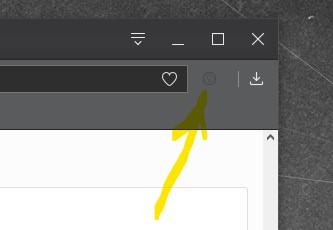
  2. Hi! Please make a light version of the extension icon for the dark browser theme in Opera.
  3. Дмитрий Сакович changed their profile photo
  4. Hello! First of all, thanks for Enpass, this app convinced me to drop 1password. The problem is one ... I have health problems and use the virtual keyboard. When I call the extension popup window in Chrome and try to enter something, it loses focus and closes. With 1password this did not happen. Win 10 pro 1803, Cent Browser, Comfort keys pro 9.0

Account

Navigation

Search

Search

Configure browser push notifications

Chrome (Android)
  1. Tap the lock icon next to the address bar.
  2. Tap Permissions → Notifications.
  3. Adjust your preference.
Chrome (Desktop)
  1. Click the padlock icon in the address bar.
  2. Select Site settings.
  3. Find Notifications and adjust your preference.