


Garima Singh
Enpass team member
-
Joined
Everything posted by Garima Singh
-
Hey @Phil FR Thanks for notifying us. Let us know if the same issue occurs again.
-
Hey @Helmut Irle We understand the issue you have been facing. Please rest assured that we are working on it and the fix version will be available in the upcoming version of Enpass extension. Stay tuned! Thanks for the co-operation.
-
Hey @Isavwa Welcome to the forum! If I have understood your correctly, you are trying to transfer the Enpass data from your old device to new device but you don't remember the master password of Enpass which was set earlier and you were accessing Enpass with face-id on the old device. Sorry to inform you that there is no way to recover your master password. For more info, refer to this FAQ. However, we have one solution for you if you are able to access Enpass using a fingerprint/Face ID on your old device. To know more, please have a look at this link of forum post. Thanks!
-
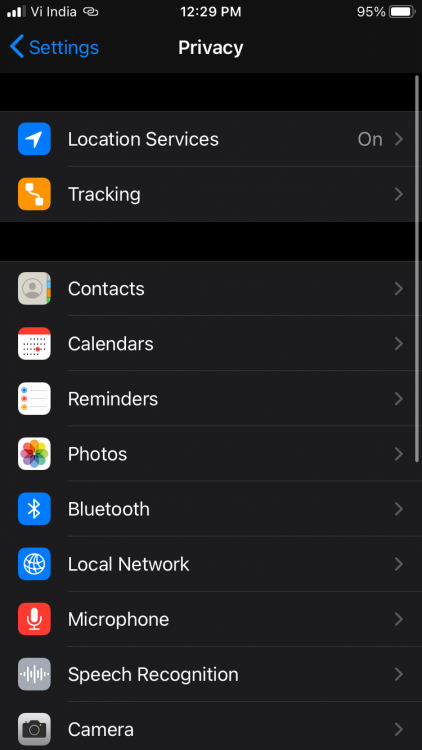
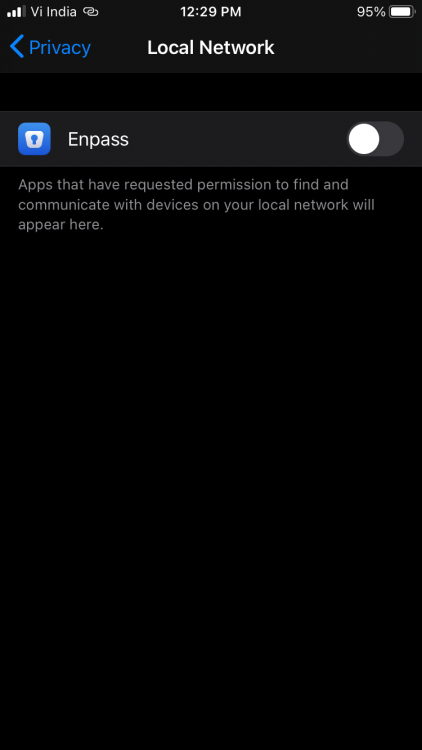
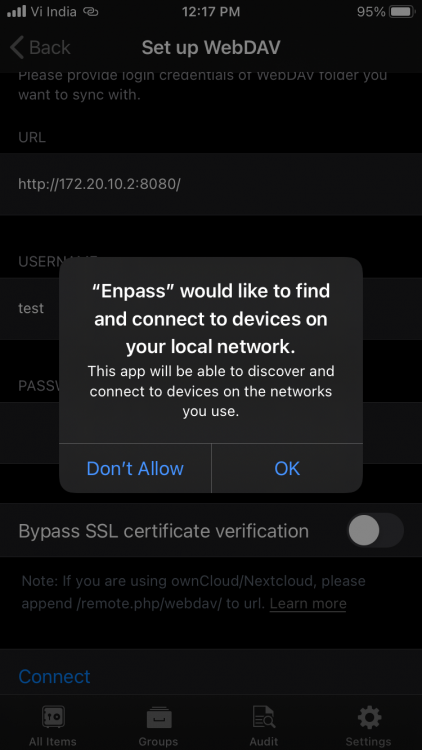
Hey @BCMguy Welcome to the forum! Please try the following steps: Go to iPhone Settings -> Privacy -> Local Network -> Enable Switch for Enpass. If Enpass is not visible in the list. Reconnect WebDAV sync and allow permission. Also, attached screenshots for your reference.

-
Hey @sixdas Thank you for writing back. The difference between the website version and the store version is that the website version of Enpass allows you to change the data location of the Enpass app, which is not possible with the store version of the Enpass app. Another difference is that with store version of Enpass, you will be able to use full-time windows hello or Touch ID feature, which is not possible with website version of Enpass.
-
Hey @Seger Thanks for reporting this issue with the details. It's been shared with our team so that they can thoroughly analyze it.
-
-
Hey @Kim Hoover Thanks for sharing this input. I have highlighted this problem with my team to look into this. Please co-operate with us.
-
Hey @Johanna Welcome to the forum. Generally subscriptions automatically renew unless you cancel it. It would be really helpful if you let us know from where (App Store or Enpass Website) you have purchased the Enpass one-year premium subscription. Thanks!
-
Hey @LGABRIELSE@VERIZON.NET Thanks for notifying us that the issue is resolved. I have noted your request.
-
Hey @Peter Pan Welcome to the forum! It seems there is 2 vaults(primary and secondary), primary vault doesn't have a keyfile and you are trying to restore the data from Google-drive in the secondary vault which has a keyfile. Please check again the particular secondary vault keyfile and use the same to restore the data. Let me know if you have any concerns. Thanks!
-
Hey @dhaval Thanks for sharing your valuable suggestion on this feature. I have noted it as it's our core functionality to auto-fill on the websites in the best possible ways.
-
Hey @slamep Welcome to the forum! For quick troubleshooting, disconnect the sync from all the devices and reconnect it again. If your problem persists, please share the following details so that we can investigate where the problem could be. Which Enpass version are you using on each device? Which cloud are you using to sync the data?
-
Hey @The Game Thanks for writing back. I have notified your inputs along with the suggestion to our team. We are able to reproduce this issue at our end, and our team is working on it. Hopefully, the fix will be available in future updates. Stay tuned for the updates of Enpass.
-
Hey @Fabio82 Welcome to the forum! We are glad to that the issue has been resolved. Thanks!
-
Hey @Phil123 Welcome to the forum! For quick troubleshooting. disconnect the sync on all the devices and reconnect it again. If your problem persists, please share the following details so that we can investigate where the problem could be. On which all devices and OS versions (mention all) are you using Enpass? Which Enpass version are you using on each device? Please share the error message or code you see during sync? Thanks!
-
-
Hey @CleosMom Please follow the below steps to install Enpass from the website- Take the manual backup of Enpass data using the steps given: Open Enpass > Click on 'File' from the Enpass Menu > Backup all vaults > Select the location and save it. Now uninstall the Enpass app. Install again using this link (website version is given at the bottom of the page). Restore the Enpass database from the backup file saved locally. Please check the auto-backup folder of Enpass using the steps- PC>Documents>Enpass> Backups, and you will last 60 backup files saved within this folder (file format will be xxxxauto.enpassbackup). To know more, refer to this link. Let me know if you have any queries. Thanks!
-
Hey @CleosMom I have reverted you on your other forum posts as well. Please revert if you have any concerns.
-
Hey @CleosMom Yes. The backups are taken automatically at regular intervals to your device using auto-backups. No. Please check in the documents folder within the folder of Enpass, you will see many xxxxauto.enpassbackup option, where you will last 60 backup files saved within this folder.
-
Hey @Disko Welcome to the forum! Make sure you are using the correct master password by copying and pasting the master password in the password field to restore the data from Dropbox. If this doesn't help please confirm if you are able to access all Enpass data on the Android phone with the same master password, so that we can help you to restore the data on the new PC.
-
-
Hey @niklas Sure. Will notify once we receive any update. Thanks!
-
Hey @MirkoMK Sorry for the trouble you are facing. If I have understood you correctly, you have two vaults on your desktop, Primary vault is synced with iCloud, secondary (Family) is synced with Google Drive. You want to add and access your Family vault on your iOS device. To do so, please follow these steps: Open Enpass on your iOS device. Then go to App Settings > Vaults > Tap on '+' to create a new vault. Enter the vault name (say Family) and tap continue. Now you see some options, i.e., Create a new database or Restore existing data from a cloud. Click on Google Drive cloud under 'Restore from the cloud,' to restore your Family vault data. Once clicked, you will be redirected to the Google Drive login page. Enter your Google account details with which you have configured sync on your desktop device and allow authentication. Now, wait till the database is restored from Google-drive. If you have already created a secondary vault (Family) on your iOS device, but it doesn't contain any database. Go to App settings > Vaults > Secondary vault > Enable sync > select Google Drive and restore data using the step 4 mentioned above. Hope this helps! Thanks.
-
Hey @oaks Thanks for letting us know that you would like to see support for the same. Significant user demand is a big factor that determines our priorities for new features. The request of this feature has been noted again and shared with the team.
