Leaderboard
-
Cristian
Members2Points8Posts -
Vinod Kumar
Enpass team member2Points509Posts -
renz
Members1Points25Posts -
Anshu kumar
Enpass team member1Points2062Posts




Popular Content
Showing content with the highest reputation on 04/26/17 in Posts
-
2 pointsHi @Arthur Rump, Thanks for providing really helpful pointers. We will be including Windows Hello support in next major version.2 points
-
1 pointI'm loving Enpass and would appreciate a portable version of the desktop manager that can be used without administrative privileges (for those of us who want to use in an environment without such privileges - i.e. at work or at a library). I don't think that's counter-intuitive to the basis for EPM - i.e. to store passwords locally - as I believe those could be stored on a USB and/or synced/pulled with/from one's cloud storage syncing solution of choice. Please consider1 point
-
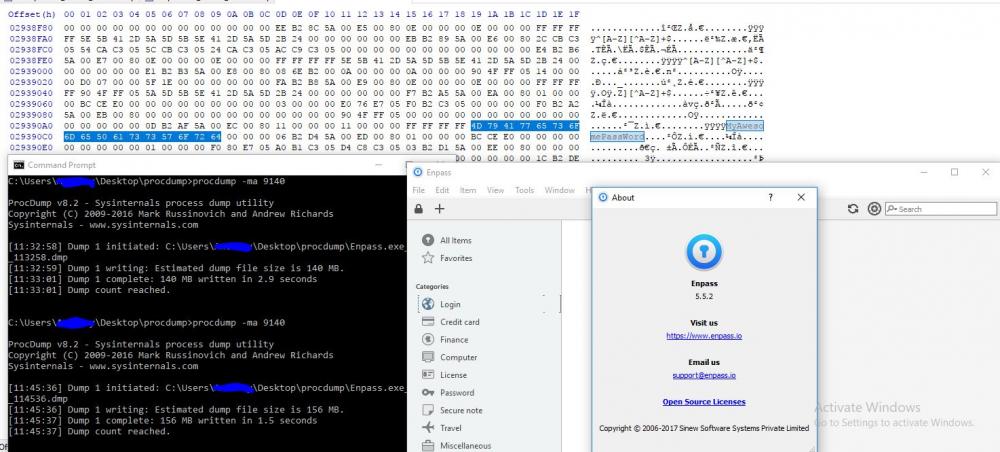
After seeing a tweet from someone able to get a master password from a memory dump on Linux, I tried it my self and was able to get a password from a locked database. This is on Windows 10 running creators update. Here is a screenshot.
 1 point
 -
1 pointIt would be really nice if you could copy multiple fields in a password object once so it will be easier to use Enpass in a native application where Enpass not able to autofill. Scenario: 1. You launch ie Spotify application 2. You open Enpass (short key?) 3. You enter Master/Pin code if needed. 4. You enter Spotify in search field 5. You press arrow down to mark Spotify item and copy the item (ctrl+shift+c?) 6. In the Spotify app, first ctrl+v paste username, second ctrl+v paste password1 point
-
1 pointSome suggestions for the mobile apps: Scan barcodes/QRs. generate those codes back as an fullscren-image, to show in the store etc. Scan NFC-tags. Export secret to another NFC-host? wouldn't that be a cool offline-way to share a secret with someone? In Android, Let Enpass be a target in "Share to"-menu for textstrings and numbers. Themes, c'mon.. light/dark atleast, you did it in the UWP-app ;-) in Android Wear-app, if only one field is shown on watch, increase that one textstring and center it, like you do on TOTP when shown on wear-app.1 point
-
1 pointHello The current cap limit of the password generator is 50 characters, but why stop there? Many websites support 2048 characters, or even more. You never need to learn them, Enpass would just populate them and iOS appps would only need to be setup once and then will remember the password. A perfect example is Facebook, easily 2048 character password, install the app, configure it, it never asks for the password again and web based login is easily done with fill from Enpass. Also, a new field with 'special characters' could be added in the recipe. See: http://passwordsgenerator.net/ Thanks1 point
-
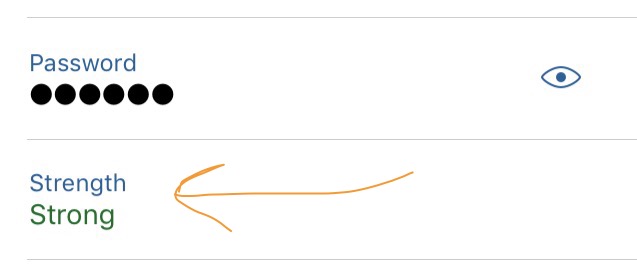
Hello When viewing the contents of a category, let's say a website which has a login user and password field, there is also a whole line below the password which suggests the password strenghts (weak, good, etc). However, that is being displayed all the time and takes a lot of space. I understand it to be present in Edit mode, when we add the password, but it would be great to not have it displayed all the time or maybe a switch to turn it off or on. This only appears for Password field type, for text, numeric, etc it does not appear. Having a marker like this makes sense, but only in Edit mode, there is no need to have it there all the time, maybe only have it appear when the password is weak, but when it's strong it could go away / hide. Thanks
 1 point
 -
1 pointHey, I've started using Enpass some months ago and I absolutely love it! I switched from LastPass and Enpass is so much better! They only significant problem I have with Enpass is the URL detection, which is quite weak to be honest. I would love to see future improvements where the URL detection consider the port, subdomain and folder. For example my homeserver has multiple websites on different ports, but Enpass shows me anywhere every single password item. Thanks.1 point
-
1 pointHi @Steffan, Thanks for writing in. For legacy reasons we need full access to OneDrive (Enpass works with OneDrive since the days when there was no App folder support in OneDrive) and OneDrive SDK shows you all those permissions as a side effect. We do not touch any file outside Enpass folder in you root drive. However, we are planning to migrate Enpass data to its own app folder in near future. Thanks for your understanding!1 point
-
1 pointHello, everybody! I truly understand your concern for a software holding critcal information and not being open sourced or audited by any credible third party agency. Well guys, thanks for all your comments and we've decided to get third party audit of Enpass. But all we need is just some more time as after the upcoming release of Attachments (beta is already there), we'll work on some key features like multiple-vaults with a need of refactoring the core engine, and I think that would be that best time to go for audit, all at once. Till then, please bear with us and all I ask for is your co-operation. Cheers!1 point
-
I'd still recommend to hurry this feature. I've heard many people say that their only reason to not use this program is because it looks 'rather unpolished'. The program is nearly up to par with competitors, but I believe aesthetics play a major role in a buying decision.1 point
-
Yes thats great but it would be greater to access the enpass menu bar icon by shutcut. For example: the Mac AppStore asks me for my password, i press alt + Space (for example) the enpass menu is comming up end i can directly start typing "iTunes" and select/copy the password by keyboard. Everything without using the mouse.1 point