
Jump to content
View in the app

A better way to browse. Learn more.

Enpass Discussion Forum

A full-screen app on your home screen with push notifications, badges and more.

To install this app on iOS and iPadOS
  1. Tap the Share icon in Safari
  2. Scroll the menu and tap Add to Home Screen.
  3. Tap Add in the top-right corner.
To install this app on Android
  1. Tap the 3-dot menu (⋮) in the top-right corner of the browser.
  2. Tap Add to Home screen or Install app.
  3. Confirm by tapping Install.

kvon

Members
  • Joined

  • Last visited

Everything posted by kvon

  1. Thanks, that seems to have worked - I think it was toggling the enable auto backup that did it. Curious, what is it that triggers an auto backup? Is it time of day, or is it event triggered? Also, does Enpass clean up the old archived backup files or is that up to me to maintain? Thanks again,
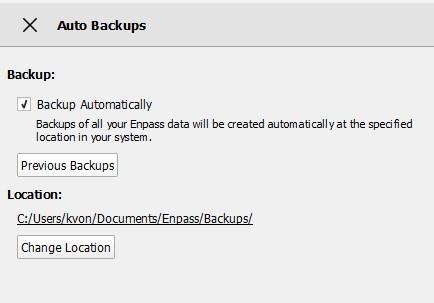
  2. Hello, After configuring auto backups to save to a folder in my documents, it worked fine for a while, backing up once/day then just stopped a couple of weeks ago. After multiple web searches I found only one report of such a thing - the user claimed the culprit was adding attachments to items in the vault. I didn't even know you could do that so it's not what's causing mine. Any insights would be greatly appreciated.

Account

Navigation

Search

Configure browser push notifications

Chrome (Android)
  1. Tap the lock icon next to the address bar.
  2. Tap Permissions → Notifications.
  3. Adjust your preference.
Chrome (Desktop)
  1. Click the padlock icon in the address bar.
  2. Select Site settings.
  3. Find Notifications and adjust your preference.