

jbn75
-
Posts
4 -
Joined
-
Last visited
Posts posted by jbn75
-
-
Is the "Restore from backup" functionality working in Enpass v6.0.0.197? I have somehow ended up with a very old version of my vault.
I'm not seeing any "restore" option in this new version.
-
4 hours ago, jbn75 said:
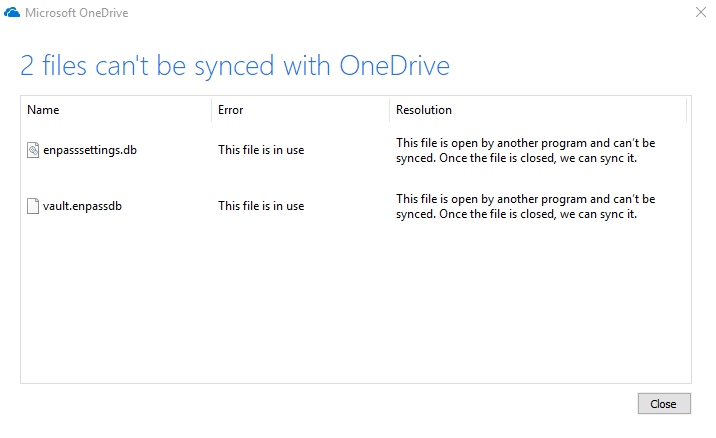
I absolutely love the direction of the new version! I just installed beta v6.0.0.149. However, I'm having problems syncing with OneDrive. The changes I make in the desktop version, are not reflected in the Android version (v6.0.0.58), or on a laptop running v6.0.0.149. I've uninstalled both the desktop and Android versions, and reinstalled both but get the same result. If I go to Settings > Vaults > Primary on the Windows version, it says "Synchronizing..." and just spins forever. OneDrive indicates files are open, and is unable to sync them (screenshot attached). I closed the app, and the files were able to sync, but the data is still the old version on my other devices. The Android app seems to go through the sync process without error. I'm running Win10 build 1809.
Let me know if there's something I can do to help troubleshoot, and thank you for all of your hard work!
This seems to have resolved itself on the last uninstall/reinstall.
-
I absolutely love the direction of the new version! I just installed beta v6.0.0.149. However, I'm having problems syncing with OneDrive. The changes I make in the desktop version, are not reflected in the Android version (v6.0.0.58), or on a laptop running v6.0.0.149. I've uninstalled both the desktop and Android versions, and reinstalled both but get the same result. If I go to Settings > Vaults > Primary on the Windows version, it says "Synchronizing..." and just spins forever. OneDrive indicates files are open, and is unable to sync them (screenshot attached). I closed the app, and the files were able to sync, but the data is still the old version on my other devices. The Android app seems to go through the sync process without error. I'm running Win10 build 1809.
Let me know if there's something I can do to help troubleshoot, and thank you for all of your hard work!
A new beta for Traditional Windows is now available with bunch of new features, bug fixes and quality improvements
in Desktop
Posted
You can delete this post. I figured it out. Had to change the auto-backup path. Thanks!