Search the Community
Showing results for tags 'autofilling'.
Found 5 results
-
 Hi Enpass Staff, I'm dissatisfied with Lastpass Premium and am considering Enpass as an alternative. I'm currently trialing Enpass to see if the feature set is comparable and worth the transition. I have the Windows 10 (Build 1903 64-bit) Desktop app, the Chrome extension (on Version 79.0.3945.88 (Official Build) (64-bit)) and now the Android app. As per the discussion here it appears that auto-fill for saved identities has been implemented. One of the primary reasons I'm transitioning away from Lastpass is the extremely poor customer service I received while reporting a phishing vulnerability. I want to ensure Enpass is not vulnerable to the same "hidden field" auto-fill vulnerability that Lastpass (and Chrome) are. I attempted to test to see if this is the case on the Github page of the developer who discovered it: https://anttiviljami.github.io/browser-autofill-phishing/ But I can't seem to get the identity to auto-fill from the Chrome extension. To test whether it was that specific form that could not be filled, I went to a basic HTML form on w3schools to see if I could auto-fill the fields using the saved Identity - and it doesn't appear that I am able to. Am I missing something? As per the article, auto-fill for identity was implemented in 2016, but based on my experience thus far that doesn't seem to actually be the case.
 -
 Autofilling in Android does not work (Android 7, Xiaomi Redmi Note 4). Chrome browser is used by default. System settings: Accessibility - Services - Enpass autofilling option is enabled. Autofilling option in Enpass settings is enabled as well. What's wrong?
 -
Hello! Autofilling in Vivaldi.net and Mail.ru do not work from the program
-
 Hello, The firefox extension (v. 5.3.4) does not work on a website i created. The login form has the following html code: <div class="form__field"> <label><!-- react-text: 146 -->Username<!-- /react-text --><!-- react-text: 147 -->:<!-- /react-text --> <input step="" name="username" value="" class="" type="text"> <p class="help-text">Usernames are not e-mail addresses.</p> </label> </div> <div class="form__field"> <label><!-- react-text: 152 -->Password<!-- /react-text --><!-- react-text: 153 -->:<!-- /react-text --> <input step="" name="password" value="" class="" type="password"> </label> </div> <div class="login__sumode"> <div class="form__field"> <label><!-- react-text: 158 -->Target user<!-- /react-text --><!-- react-text: 159 -->:<!-- /react-text --> <input step="" name="targetuser" value="" type="text"></label> </div> </div> <div class="form__actions"> <button type="submit"><span>Login</span></button> </div> The target user is hidden with CSS. Any idea? Thanks, Nighthawk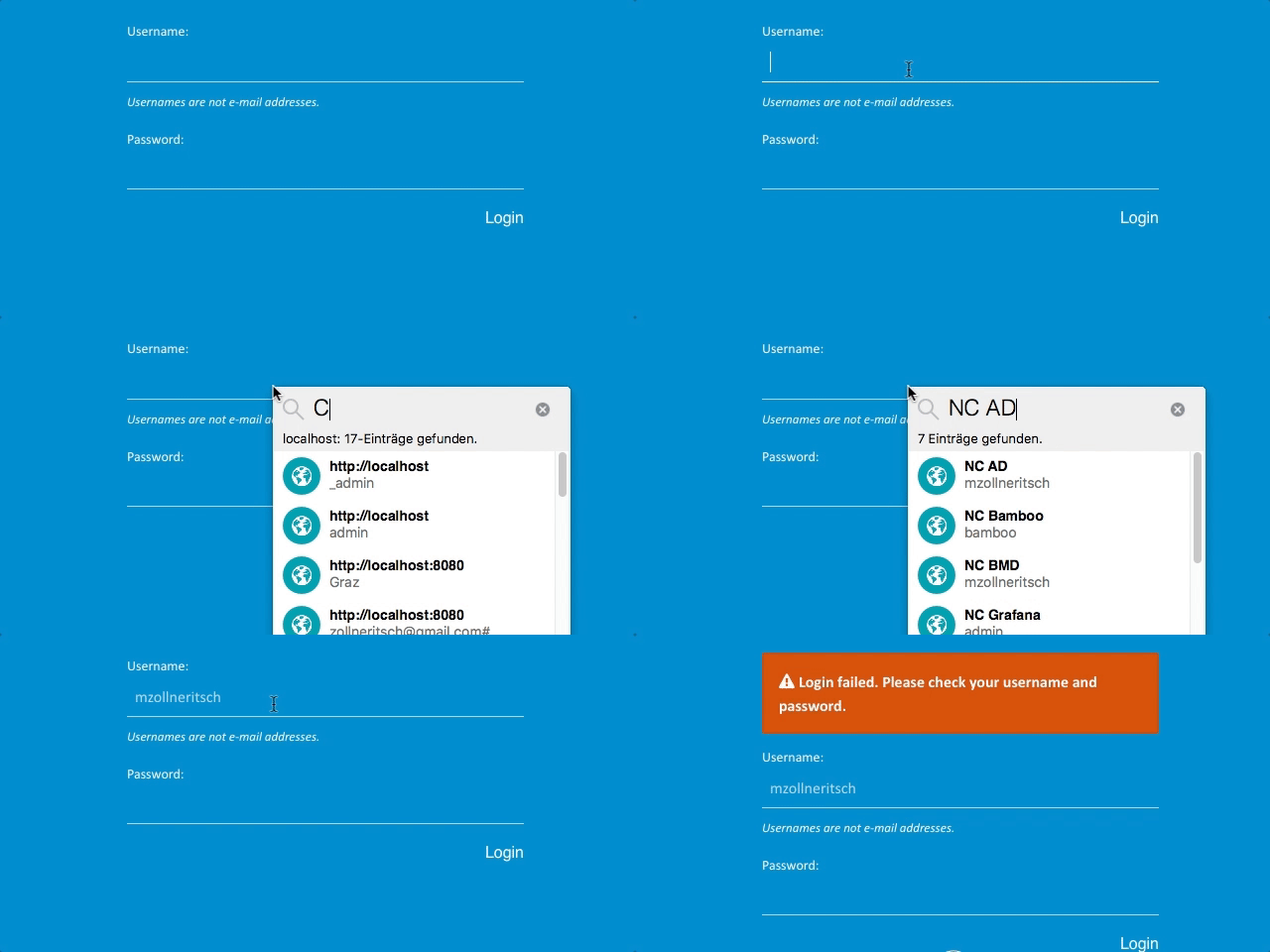
-
I've problem with autofilling on my android with some apps. E.g. I've an account in Raiffeisen Bank, so url in Enpass is http://connect.raiffeisen.ru/rba/logout.do Also I've an app for Android: https://play.google.com/store/apps/details?id=ru.raiffeisennews the package name of app is ru.raiffeisennews So every time when I try to use AF in Enpass it says that can't find login for raiffeisennews.ru. I've added "raiffeisennews" into record name. It didn't help. I've added "raiffeisennews.ru" into the record. It didn't help also (Right name the record name is "Raiffeisen: raiffeisennews.ru". My questions is - could you add a fuzzy search to the mobile app so that it can easily match the application name and the web address or part of the record name. Or simply add an optional filed like "package name" to the each record in db. Thanks.

