Teyln
Members
-
Joined
-
Last visited
-
iPhone XR and iPad 2019 latest iOS versions enPass Version is also up to date (6.5.0 (473))
-
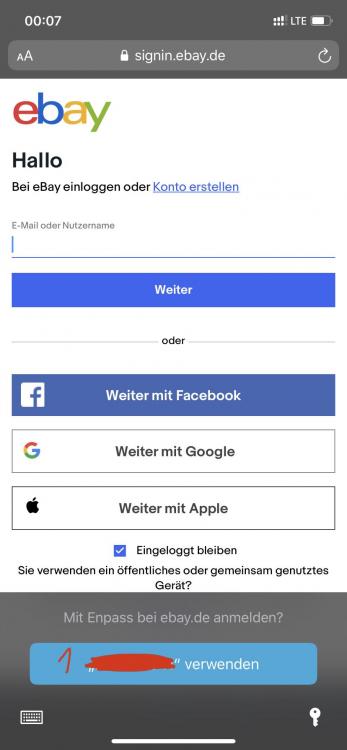
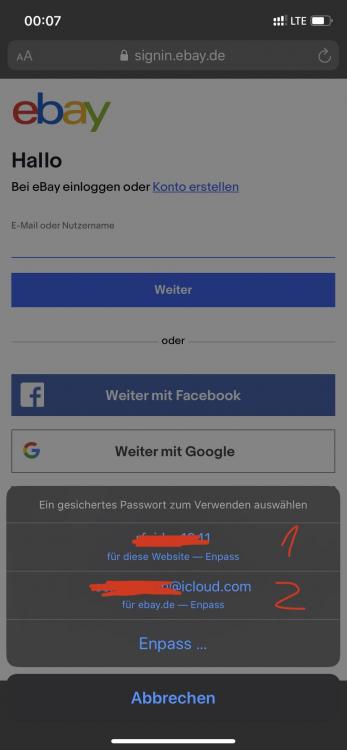
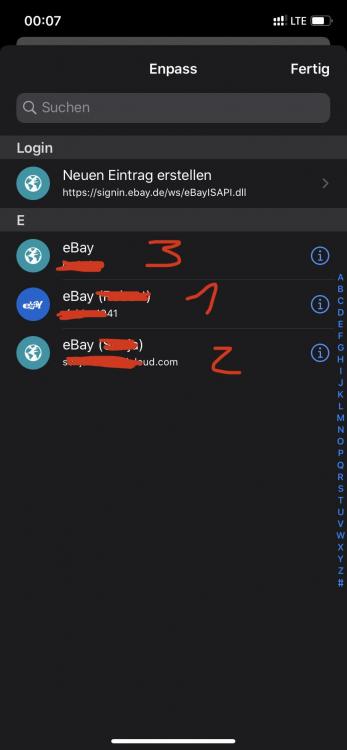
Hi @Pratyush Sharma, please find 3 screenshots attached to show what I mean. I chose eBay.de as an example: I have 3 eBay accounts saved in Enpass. On the first screenshot you see the standard suggestion, let‘a call it account 1. On the second screenshot (shows up when I press the key-button on screenshot 1) you can see that Enpass proposes 2 different login accounts for eBay. The one from screenshot 1 (account 1) and another one, let’s call it account 2. On the third screenshot (shows up when I press „Enpass“ on screenshot 2) you can now see all 3 account listet within the Enpass interface. The 2 accounts from above and a third one, let’s call it account 3. Unfortunaley, account 3 is my most commonly used eBay account. How can I tell Enpass to show this account 3 as standard (screenshot 1) or at least in the short-list (screenshot 2)?
-
Teyln joined the community
-
Hi all, I use Enpass with Autofill on the iPhone. For some websites like Outlook or Amazon I have multiple accounts / login data stored in Enpass. (1) Is there any way to tell Enpass, which one should be autofilled? (2) In the “longlist” (the menu you see in a first step) that is shown when multiple accounts are stored for a particular website I don’t see all of those stored accounts. For some I need to go even one step further in the process chain and open Enpass itself to select the right account. How can I tell Enpass which to show - and which not? Thanks in advance!