chebum
Members
-
Joined
-
Last visited
-
Many thanks for the reply and the upcoming fix. The idea with a popup was good if it works. Keep the great work!
-
I tried and it still doesn't work. It also doesn't work with some other apps like Interactive Brokers and many other apps like the VPN app reported by other user. The problem with the current approach is that there is no way to force the auto-fill dialog to appear. Previously I was able to tap on a Enpass notification and it opened autofill dialog for me. Now, if the app doesn't detect the autofill capability, I'm stuck. With older version I had an option to force the autofill dialog to appear. BTW, do you know if APKMirror is a safe place to download older version of the app? It's stripe.com. When you refund a purchase, the website asks for a password. The autofill popup appears, but if I click on it, it enters my email into the browser's address bar.
-
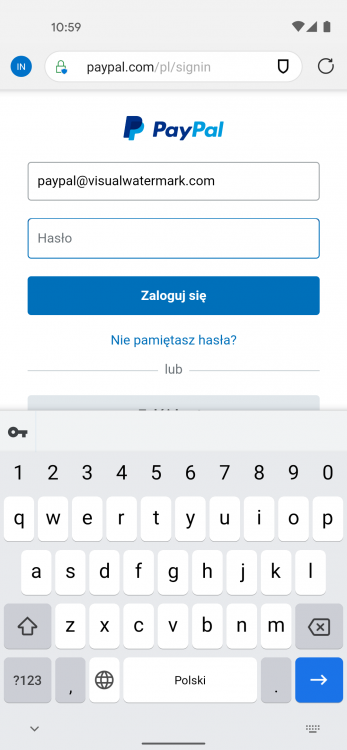
The new behavior see to be non-working on many websites. For example, PayPal. On some websites, the autofill bar appears, but it autofills into the wrong place. User name is filled into the address bar. Is it possible to bring older behavior back?
-
Thank you for the reply. For example, google.com. Actually, the enpass bar in the notification area stopped appearing at all. No matter what website or app I'm using. Previously, I was able to swipe from the top and click on Enpass bar to auto-fill my password, but now that bar is gone.
-
Hello, Until about 2 weeks ago I was able to swipe from top of the screen and choose the "fill with Enpass" option. Now that option is gone. All I have is a popup next to input fields and a keyboard. Is it possible to bring Legacy autofill back? I tried to disable and re-enable the assistance features for Enpass. This didn't help. I tried to disable and re-enable the legacy auto-fill in the Enpass app itself. This didn't help. I tried to uninstall and re-download the app from Play Store. Unfortunately, with no luck. Any ideas on how to bring it back? My phone is Google Pixel 4A. Android 11 (RQ2A.210305.006). Enpass version is 6.6.3.467.