

Skip to content
View in the app

A better way to browse. Learn more.

Enpass Discussion Forum

A full-screen app on your home screen with push notifications, badges and more.

To install this app on iOS and iPadOS
  1. Tap the Share icon in Safari
  2. Scroll the menu and tap Add to Home Screen.
  3. Tap Add in the top-right corner.
To install this app on Android
  1. Tap the 3-dot menu (⋮) in the top-right corner of the browser.
  2. Tap Add to Home screen or Install app.
  3. Confirm by tapping Install.

rvst1

Members
  • Joined

  • Last visited

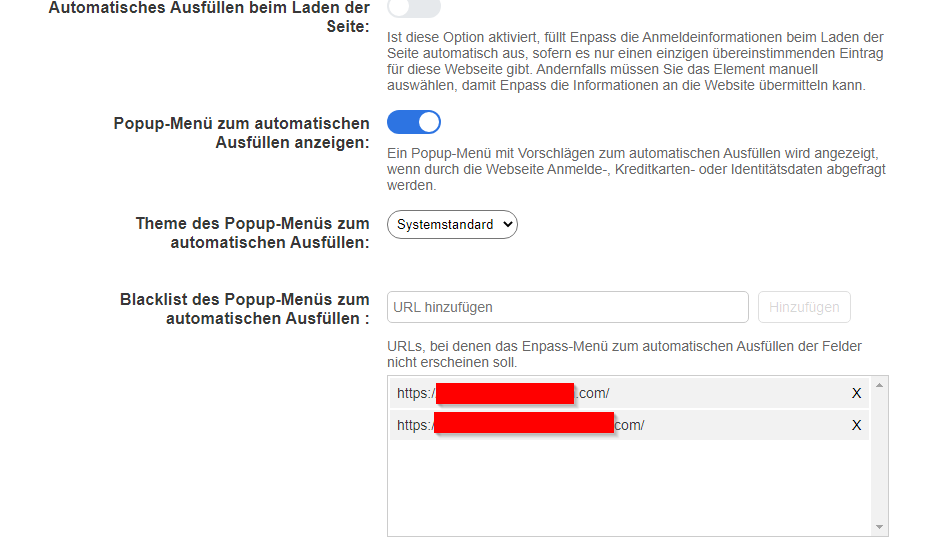
  1. I do have the exact same problem. Happens in Chrome, Firefox, Edge (Chromium) since 6.7.0 extension. You are not able to select fields in Service Now https://www.servicenow.com/ Pobably no Service Now User will be able to tell you a website as those are all customer instances only the customer has access to. The only way you could check this is probably with a ServiceNow developer instance (its free for everyone but will be deleted after 7 days of inactivty) which also replicates how customer instances are working. It can be requested after registration from here. Unfortunately black listing your instances sites doesnt seem to work. Only disabling pop-ups seem to fix the issue for now. Will this help you to fix the issue?

Account

Navigation

Search

Search

Configure browser push notifications

Chrome (Android)
  1. Tap the lock icon next to the address bar.
  2. Tap Permissions → Notifications.
  3. Adjust your preference.
Chrome (Desktop)
  1. Click the padlock icon in the address bar.
  2. Select Site settings.
  3. Find Notifications and adjust your preference.