

Skip to content
View in the app

A better way to browse. Learn more.

Enpass Discussion Forum

A full-screen app on your home screen with push notifications, badges and more.

To install this app on iOS and iPadOS
  1. Tap the Share icon in Safari
  2. Scroll the menu and tap Add to Home Screen.
  3. Tap Add in the top-right corner.
To install this app on Android
  1. Tap the 3-dot menu (⋮) in the top-right corner of the browser.
  2. Tap Add to Home screen or Install app.
  3. Confirm by tapping Install.

Denis Zoljom

Members
  • Joined

  • Last visited

  1. I didn't know there were options for the extension :facepalm: This is a life saver! Thanks @DenalB!
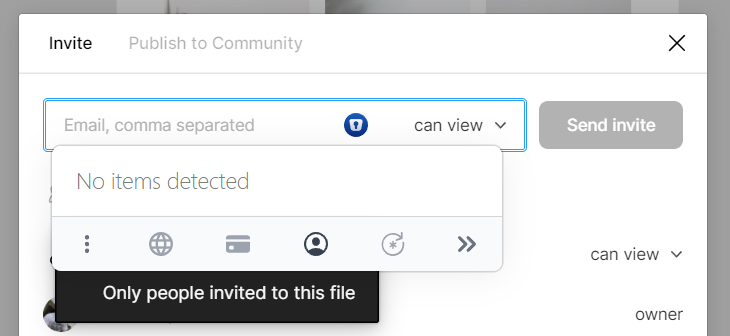
  2. Can you please remove the huge suggestion dropdown for Enpass extension? It's super annoying and it's constantly blocking other inputs. In Figma I got this I clicked on the who can see the file dropdown, and because the input is focused the huge and intrusive popup came in my way and I had to disable the Chrome extension. I really liked the way it behaved before.

Account

Navigation

Search

Search

Configure browser push notifications

Chrome (Android)
  1. Tap the lock icon next to the address bar.
  2. Tap Permissions → Notifications.
  3. Adjust your preference.
Chrome (Desktop)
  1. Click the padlock icon in the address bar.
  2. Select Site settings.
  3. Find Notifications and adjust your preference.