

Skip to content
View in the app

A better way to browse. Learn more.

Enpass Discussion Forum

A full-screen app on your home screen with push notifications, badges and more.

To install this app on iOS and iPadOS
  1. Tap the Share icon in Safari
  2. Scroll the menu and tap Add to Home Screen.
  3. Tap Add in the top-right corner.
To install this app on Android
  1. Tap the 3-dot menu (⋮) in the top-right corner of the browser.
  2. Tap Add to Home screen or Install app.
  3. Confirm by tapping Install.

Sunil Surendran

Members
  • Joined

  • Last visited

Everything posted by Sunil Surendran

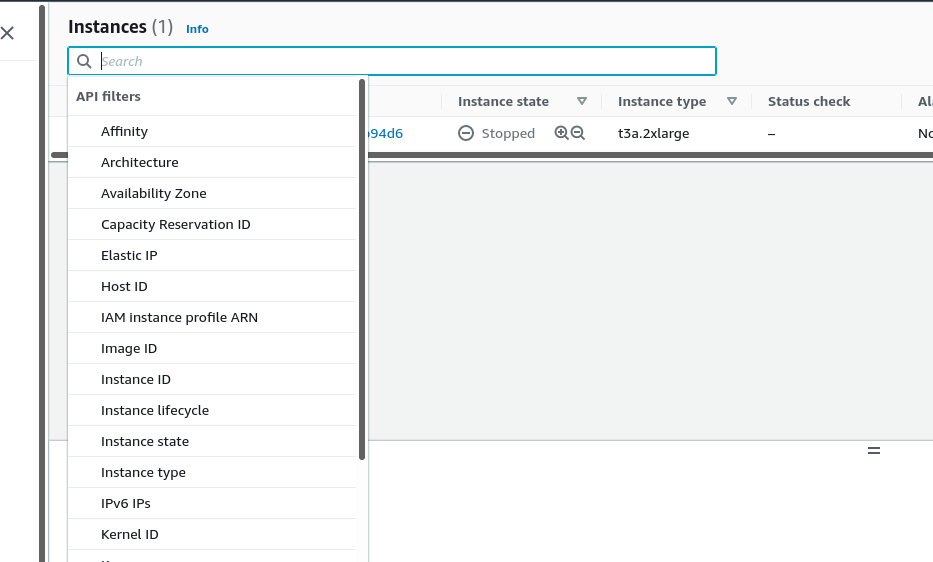
  1. Since the introduction of the "Autofill Popup Menu" in Enpass, it has been difficult to navigate the AWS console once signed in. In the AWS services where filters are available, the Filter block gets auto-selected once the page loads. Even if we click elsewhere on the page, the Filter context menu of the particular AWS service pops up and makes its harder to click elsewhere. For eg: in the EC2 console page even if we select the instance row, the Filter menu pops up back instantly. Observed this in various other sections of Ec2 launch page as well (While going through the menu of launching an instance). The Fix was to disable the "Show Inline Autofill Popup Menu" in Browser extension settings of Enpass. Can you please look into this issue.
Account

Navigation

Search

Search

Configure browser push notifications

Chrome (Android)
  1. Tap the lock icon next to the address bar.
  2. Tap Permissions → Notifications.
  3. Adjust your preference.
Chrome (Desktop)
  1. Click the padlock icon in the address bar.
  2. Select Site settings.
  3. Find Notifications and adjust your preference.