jknight
Members
-
Joined
-
Last visited
-
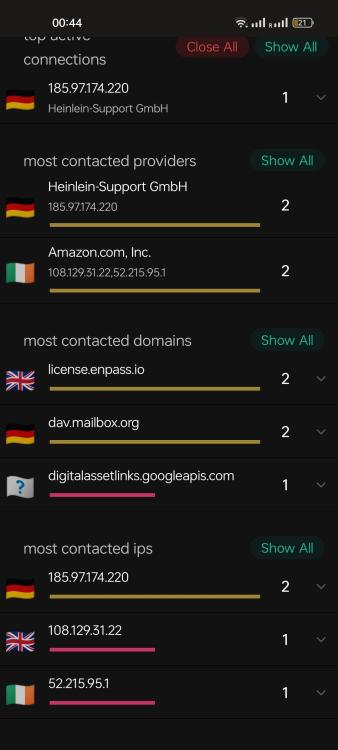
I noticed this too - enpass connecting to Amazon for no obvious reason. I blocked the connections and haven't seen loss of functionality yet so I'm not sure what it's for
-
+1 for reddit autofill not working in enpass v6.11.6 (1833)
-
+1 for this problem
-
-
This is not a feature request, but just wanted to say I've tried every password manager I can find (including using LastPass for a year) and enPass is by far and away the best. ✅ Bring Your Own Cloud storage Amazing ! I use https://pcloud.com webdav to store and sync my enPass passwords. Unlike LastPass for example, my passwords stay on my own accounts ✅ Lifetime membership I paid the €71.19 for a life time membership. It is great value. All other password managers have the dreaded monthly subscriptions ✅ Imports work great I dumped my lastpass passwords and imported them to enPass flawlessly. I've tried password imports with other password managers and they bomb out with line breaks in csv files. enPass's import is perfect ✅ Android autofill that actually works The Android autofill is only slightly flaky but is already far superior to any other I've tried ✅ Deksktop Apps, Browser Plugins These work so well there's almost nothing to comment on. Hats off to enPass's dev team ✅ Shared Vaults The whole password vault concept is great. I have a vault with all 921 of my passwords, and a shared vault with my wife ✅ Excellent password suggestion functionality The password suggestion functionality is top top - I love the pronounceable word suggestions with dashes. Is is so much easier on the eyes than some 20 random char monstrosity, but I can choose those too if needed Again, great work enPass dev team, you nailed it ✅ The Audit section is great Weak passwords ? Identical passwords ? It's all right there without being annoying I could go on, but just wanted to say THANKS! I hope enPass crushes LastPass and other competitors, because it's clearly the best in the market. If I have any criticism it's that it's really hard to find enPass in the first place. It barely shows up in any of the "top password managers for 2022" type search results.