

Skip to content
View in the app

A better way to browse. Learn more.

Enpass Discussion Forum

A full-screen app on your home screen with push notifications, badges and more.

To install this app on iOS and iPadOS
  1. Tap the Share icon in Safari
  2. Scroll the menu and tap Add to Home Screen.
  3. Tap Add in the top-right corner.
To install this app on Android
  1. Tap the 3-dot menu (⋮) in the top-right corner of the browser.
  2. Tap Add to Home screen or Install app.
  3. Confirm by tapping Install.

gahawy

Members
  • Joined

  • Last visited

Everything posted by gahawy

  1. Hi @Abhishek Dewan Thanks for the reply. I tried the first 2 steps with no luch, while for the 3rd one, I'm not using multiple vaults. I'm using enpass version 6.8.6(684). I'm not facing the issue on webpages, only apps Some apps like (CIB, ARABI-MOBILE, NBE MOBILE,Mashreq Egypt) and others.
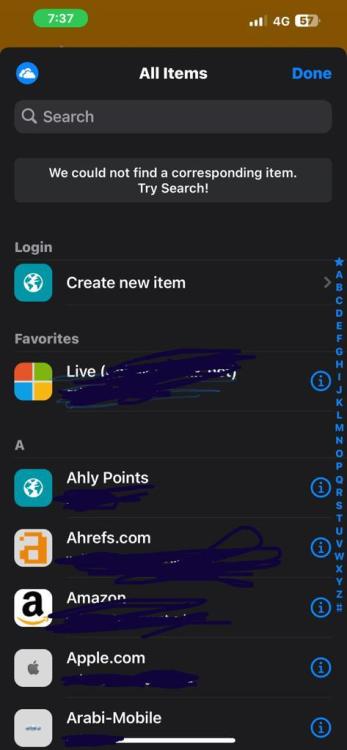
  2. I need to know the solution as well, may you me to the this solution?
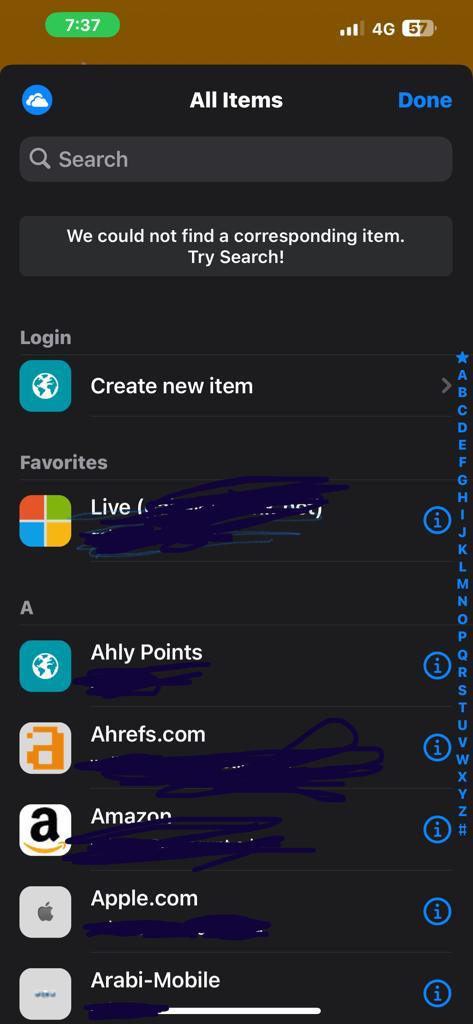
  3. I'm using iphone 13 pro max with ios 16.3 and the latest enpass version from the app store. When signing in to any application, there no way for enpass to recognize the application in order to suggest the correct login, it gives a message says "we could not find a corresponding item please try search", then it lists all available logins for me to choose from, is there a way to make enpass more smart?
Account

Navigation

Search

Search

Configure browser push notifications

Chrome (Android)
  1. Tap the lock icon next to the address bar.
  2. Tap Permissions → Notifications.
  3. Adjust your preference.
Chrome (Desktop)
  1. Click the padlock icon in the address bar.
  2. Select Site settings.
  3. Find Notifications and adjust your preference.