kvinar
Members
-
Joined
-
Last visited
Everything posted by kvinar
-
Hi, could you pls provide update regarding the release? We have zScaler now and it means I'm fully out of my all passwords. That's really big issue for me and as I can see in the thread, for plenty of others as well. Please help.
-
Hi Abhishek, pls is there any ETA for this issue resolution? And what is expected fix? I mean if you gonna add possibility to custom login button assignment, I would like to ask for option to have also possibility to add more login fields - we have some internal company web pages, where we authorize by mail, employee id and pwd combination.
-
Thank you Abhishek, the recommended workaround is helpful.
-
Windows 11 64bit 22H2, Enpass Desktop 6.8.4 (1166), MS Edge 64bit 109.0.1518.61 (official build), Enpass browser extension version 6.8.0. From top of my head, I have problem with this page only. What is surprising, when I fill the credentials manually and hit Enter key, it goes right way. So only the enpass extension from some reason pushes different button.
-
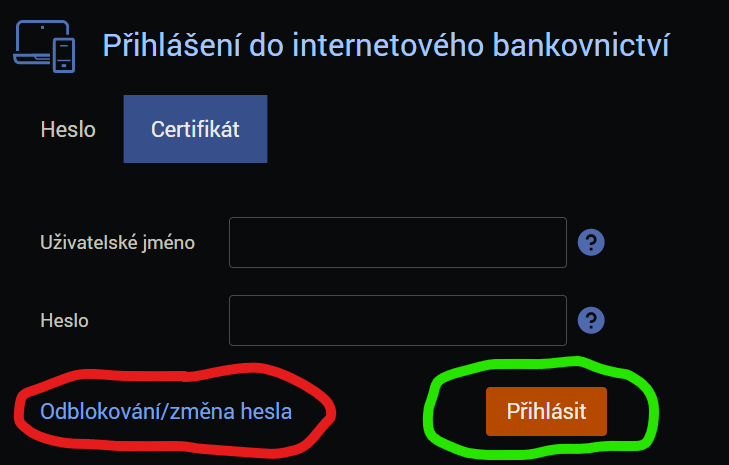
Hi, I have for some web same issue like described in this topic: Is it possible to fix it for Přihlášení | ČSOB ID (csob.cz) login page ( or could you add option to set custom trigger button for specific site? In my case is pushed the button marked with red, but should push the one marked with green: Thank you