

Skip to content
View in the app

A better way to browse. Learn more.

Enpass Discussion Forum

A full-screen app on your home screen with push notifications, badges and more.

To install this app on iOS and iPadOS
  1. Tap the Share icon in Safari
  2. Scroll the menu and tap Add to Home Screen.
  3. Tap Add in the top-right corner.
To install this app on Android
  1. Tap the 3-dot menu (⋮) in the top-right corner of the browser.
  2. Tap Add to Home screen or Install app.
  3. Confirm by tapping Install.

Davist

Members
  • Joined

  • Last visited

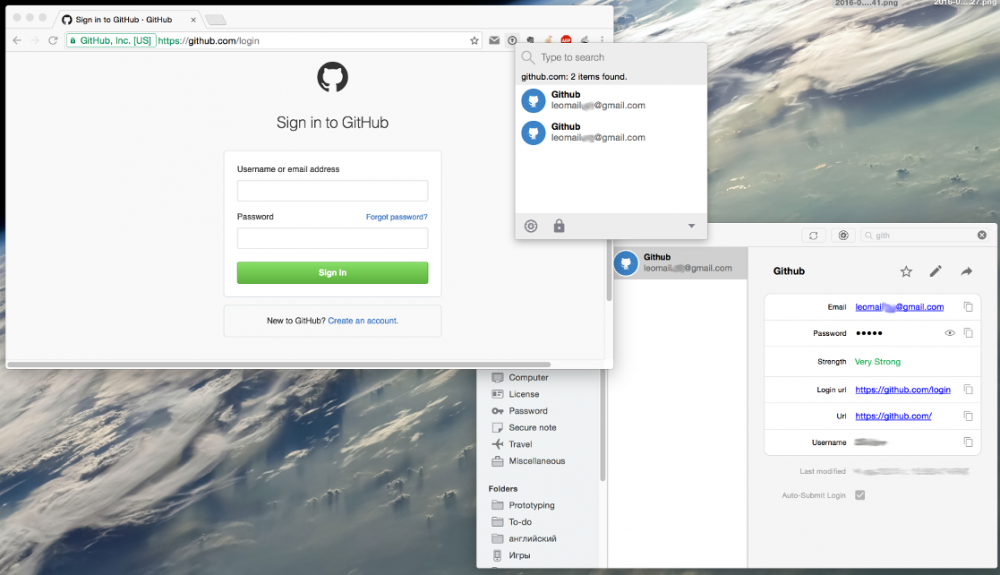
  1. Hi, thank you for great work you do! I have some items which has two similar url fields. For example github.com: main page url: https://github.com/ sing in url: https://github.com/login When I am trying to login github browser extension show me item twice. I was confusing to choose first time, because items look equal. Is that behavior normal? Can I do something to see only one item (except make item contains only one url)? MacOS 10.10.5, Enpass 5.2.1, Chrome 51.0.2704.79 (64-bit) I attached screenshot such situation.
Account

Navigation

Search

Search

Configure browser push notifications

Chrome (Android)
  1. Tap the lock icon next to the address bar.
  2. Tap Permissions → Notifications.
  3. Adjust your preference.
Chrome (Desktop)
  1. Click the padlock icon in the address bar.
  2. Select Site settings.
  3. Find Notifications and adjust your preference.