

Skip to content
View in the app

A better way to browse. Learn more.

Enpass Discussion Forum

A full-screen app on your home screen with push notifications, badges and more.

To install this app on iOS and iPadOS
  1. Tap the Share icon in Safari
  2. Scroll the menu and tap Add to Home Screen.
  3. Tap Add in the top-right corner.
To install this app on Android
  1. Tap the 3-dot menu (⋮) in the top-right corner of the browser.
  2. Tap Add to Home screen or Install app.
  3. Confirm by tapping Install.

Stelios

Members
  • Joined

  • Last visited

  1. I also use note 9 with oreo but I don't have this bug. Have you upgraded your phone to pie? I am still using oreo. However, I have different types of problems: I can never automatically fill successfully the credentials of an app.
  2. You forgot to refer that it's only available in the paid version of the Windows app.
  3. After 3 years we just receive promises. Perfect.
  4. Is this feature available? I can not find it in android app. If not, it's a shame not implementing such a useful and simple feature after 3 years of requests.
  5. Stelios posted a topic in Cloud Sync
    After the automatic upgrade, enpass on my pc doesn't sync any more showing Error 2070007. I am completely disappointed from enpass: The last 3 months enpass doesn't work with firefox and I never had the time to make debugging for your product. Now I have this new serious problem and I have to find some time to spend for debugging of your application. Moreover, after the last update of the android app, the folders (that are now "tags") are not expandable at the side bar. Terrible.
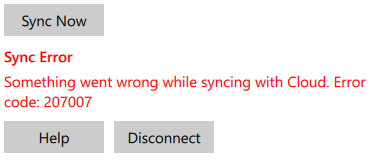
  6. Same problem here. I was planning to buy the pro version but after my first sync try I completely disappointed. Your proposed solution works but gives me an empty file.

Account

Navigation

Search

Search

Configure browser push notifications

Chrome (Android)
  1. Tap the lock icon next to the address bar.
  2. Tap Permissions → Notifications.
  3. Adjust your preference.
Chrome (Desktop)
  1. Click the padlock icon in the address bar.
  2. Select Site settings.
  3. Find Notifications and adjust your preference.