

Skip to content
View in the app

A better way to browse. Learn more.

Enpass Discussion Forum

A full-screen app on your home screen with push notifications, badges and more.

To install this app on iOS and iPadOS
  1. Tap the Share icon in Safari
  2. Scroll the menu and tap Add to Home Screen.
  3. Tap Add in the top-right corner.
To install this app on Android
  1. Tap the 3-dot menu (โ‹ฎ) in the top-right corner of the browser.
  2. Tap Add to Home screen or Install app.
  3. Confirm by tapping Install.

Letalis

Members
  • Joined

  • Last visited

  1. I did that but I managed to solve it by revoking the access in the settings menu. And adding it again.
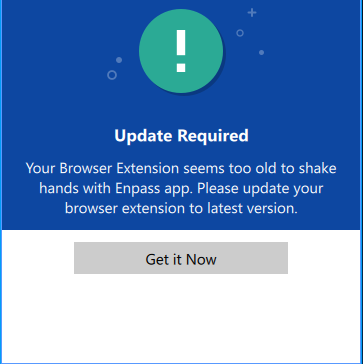
  2. I have the latest Enpass Beta 6.0.0(228) on Windows 10 Pro x64. When I try to use the Autofill function on Google Chrome (Version 71.0.3578.98 (Officiell version) (64 bitar)) I get the following Error message: Update Required Your Browser Extension seems too old to shake hands with Enpass app. Please update your browser extension to latest version. Get it Now I have tried to reinstall the Browser Extension without any luck,
  3. I can't have enpass 6.0.0.27 running when I fill out form. Asap I press ALT GR+2 or ctrl+alt+2 (getting the @ sign) i opens the main window of Enpass 6. I cant change the shortcut either cause when I have restarted the app och the computer its back to the normal shortcut which makes this issue occur.

Account

Navigation

Search

Search

Configure browser push notifications

Chrome (Android)
  1. Tap the lock icon next to the address bar.
  2. Tap Permissions โ†’ Notifications.
  3. Adjust your preference.
Chrome (Desktop)
  1. Click the padlock icon in the address bar.
  2. Select Site settings.
  3. Find Notifications and adjust your preference.