Fabrizio Ruggeri
Members
-
Joined
-
Last visited
-
Sorry, after rebooting my laptop everything is working fine. As you were guessing probably there was a second instance still running after the upgrade. Thank you for the help. Do you usually change the title to something like "Solved" here?
-
Sure. Only one instance of Enpass seems to be running fabrizio 2102 1 0 13:01 ? 00:00:06 /opt/enpass/Enpass -minimize fabrizio 9973 3880 0 13:22 pts/1 00:00:00 grep --color=auto Enpass
-
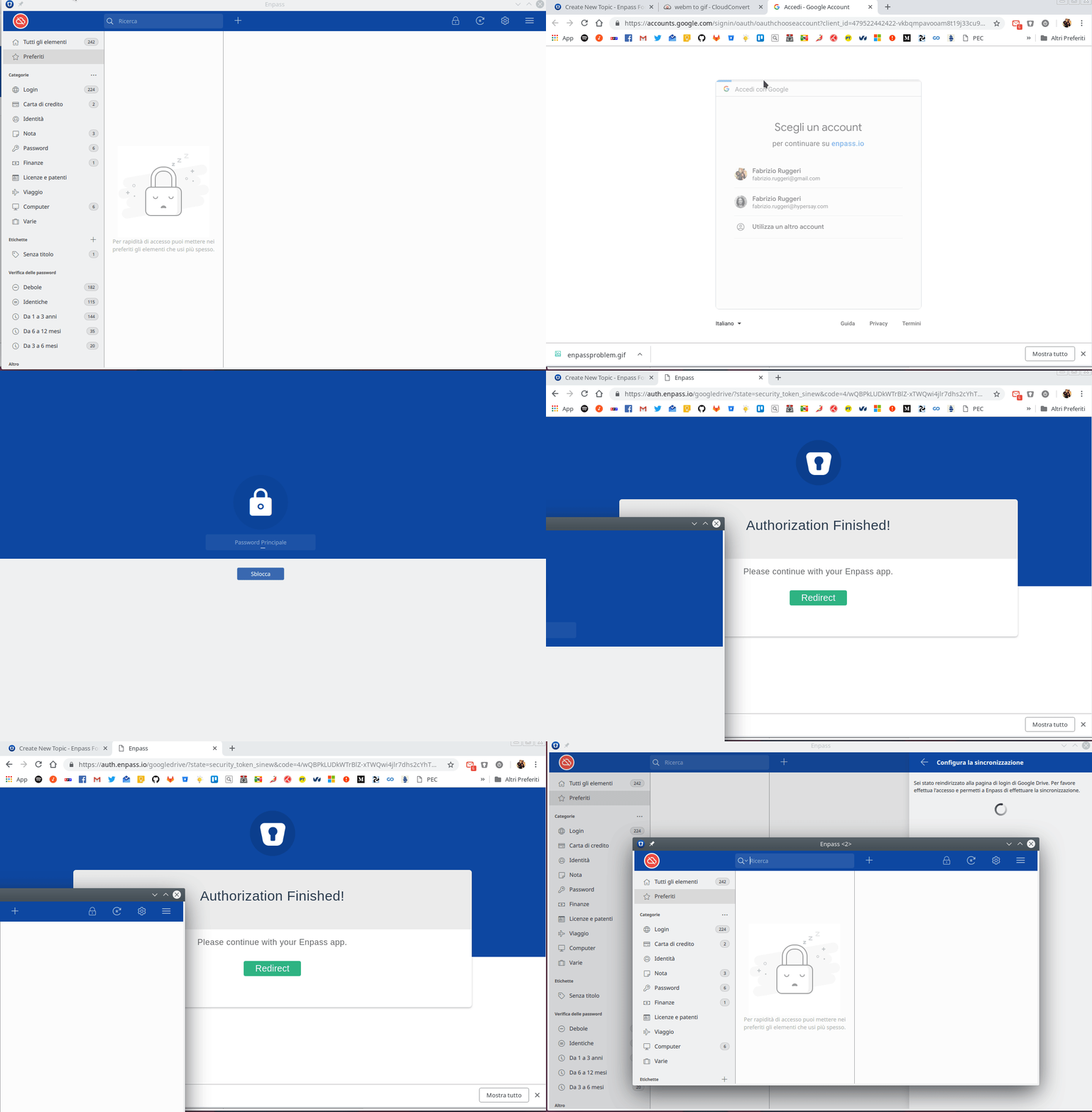
When I try to setup the sync through google drive (which was working fine on version 5) I get the step of authorizing your app. Then the xdg-open opens enpass but a new window and the first window stay always in the state of waiting for authorization process to be complete. I attach a gif to better explain the issue
-
Great news! For the moment I used the workaround from Jan. Thank you, great job guys! Fabrizio
-
I have exactly the same problem. I'm on Kde-Neon Qt: 5.7.0 Plasma: 5.7.2 Kernel: 4.4.0-31