

Skip to content
View in the app

A better way to browse. Learn more.

Enpass Discussion Forum

A full-screen app on your home screen with push notifications, badges and more.

To install this app on iOS and iPadOS
  1. Tap the Share icon in Safari
  2. Scroll the menu and tap Add to Home Screen.
  3. Tap Add in the top-right corner.
To install this app on Android
  1. Tap the 3-dot menu (⋮) in the top-right corner of the browser.
  2. Tap Add to Home screen or Install app.
  3. Confirm by tapping Install.

SierraFoxtrot

Members
  • Joined

  • Last visited

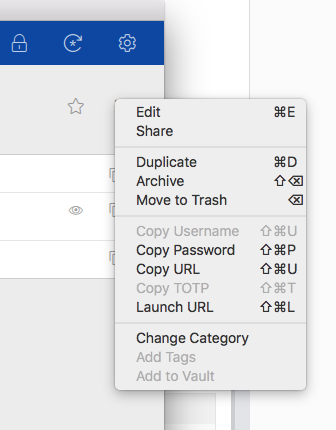
  1. Great to hear that! This should solve many sync problems for now, as in this case the Dropbox/OneDrive/etc client can take care of the syncing and Enpass only needs to write the file. Is there any estimation when the new MacOS enpass beta will be available? Another strange thing I noticed (hope it hasn't been reported elsewhere yet): The "Add to vault" option (last item) is disabled when browsing the items of "all vaults" (top left of the window). So to be able to move an item from one vault to another, I first have to select the destination vault from the top left to get that option enabled. Not sure why this is necessary...
Account

Navigation

Search

Search

Configure browser push notifications

Chrome (Android)
  1. Tap the lock icon next to the address bar.
  2. Tap Permissions → Notifications.
  3. Adjust your preference.
Chrome (Desktop)
  1. Click the padlock icon in the address bar.
  2. Select Site settings.
  3. Find Notifications and adjust your preference.