

Skip to content
View in the app

A better way to browse. Learn more.

Enpass Discussion Forum

A full-screen app on your home screen with push notifications, badges and more.

To install this app on iOS and iPadOS
  1. Tap the Share icon in Safari
  2. Scroll the menu and tap Add to Home Screen.
  3. Tap Add in the top-right corner.
To install this app on Android
  1. Tap the 3-dot menu (⋮) in the top-right corner of the browser.
  2. Tap Add to Home screen or Install app.
  3. Confirm by tapping Install.

ubna

Members
  • Joined

  • Last visited

  1. Having the same issue in Android Pie, info is given below Redmi Note 4, Android Pie 9.0 Version 6.0.0.98 Yes, i'm using custom rom built by me for security reasons. FP works well for all other applications except enpass.
  2. @Vikram Dabas may I have an update on this please? Edit: @Anshu kumar @Gajender Singh May I get an update for the fingerprint issue on Android Pie?
  3. Redmi Note 4 Failed to encrypt the data with the generated key - toast error Yes, I'm using my own build as i do not trust OEMs ROM and do not know what they are tracking from the device
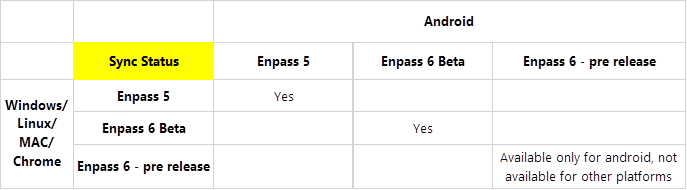
  4. I don't think it would work. Based on the above posts, I feel the sync for other platforms aren't enabled. Refer the following grid. @Vikram Dabas correct me if I am wrong.
  5. Do we have any compatible version for other platforms (such as windows/linux) which sync with this cloud backup?
  6. I have got the update that replaces stable 5 version with beta 6. However, I do not see any fix on the fingerprint for Android Pie, getting a message failed to encrypt the data with generated key Can you pls confirm, whether the fingerprint is actually fixed for Android Pie?
Account

Navigation

Search

Search

Configure browser push notifications

Chrome (Android)
  1. Tap the lock icon next to the address bar.
  2. Tap Permissions → Notifications.
  3. Adjust your preference.
Chrome (Desktop)
  1. Click the padlock icon in the address bar.
  2. Select Site settings.
  3. Find Notifications and adjust your preference.