

Skip to content
View in the app

A better way to browse. Learn more.

Enpass Discussion Forum

A full-screen app on your home screen with push notifications, badges and more.

To install this app on iOS and iPadOS
  1. Tap the Share icon in Safari
  2. Scroll the menu and tap Add to Home Screen.
  3. Tap Add in the top-right corner.
To install this app on Android
  1. Tap the 3-dot menu (⋮) in the top-right corner of the browser.
  2. Tap Add to Home screen or Install app.
  3. Confirm by tapping Install.

EnKo200

Members
  • Joined

  • Last visited

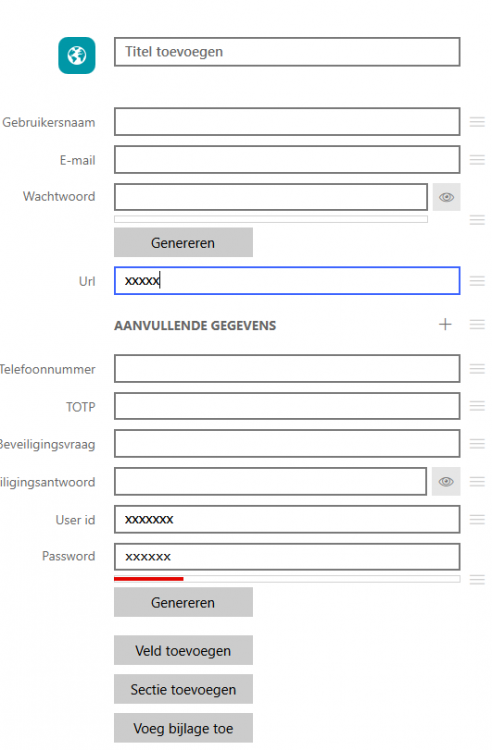
  1. Changing the language of Roboform from Dutch to English helped with the import. However a few issues remain. 1. Roboform doesn't export the full login url, only the main url, nothing Enpass can do about this. 2. Enpass often create new login ID and password custom fields. In this case Enpass is also in Dutch and probably doesn't recognize the name of the fields. Gebruikersnaam = User id Wachtwoord = Password A lot of manual corrections are needed to get this in order and with over 500 logins this takes a lot of time.
Account

Navigation

Search

Search

Configure browser push notifications

Chrome (Android)
  1. Tap the lock icon next to the address bar.
  2. Tap Permissions → Notifications.
  3. Adjust your preference.
Chrome (Desktop)
  1. Click the padlock icon in the address bar.
  2. Select Site settings.
  3. Find Notifications and adjust your preference.