Luuk
Members
-
Joined
-
Last visited
-
Clear answer
-
Thank you for working on the solution. It seems that the problem has already been reduced greatly. The fast dropdown is still not filling in automatically, but at least the old window can fill it in now. For the next time, is there a bug tracker available where I can report bugs, track the progress and/or help with testing? It might give your team valuable feedback.
-
Thank you for the update. I sent the zip and a link to the actual site to the given address.
-
Sorry for the slow reaction. Here's the zip-file. I changed the extension to plist, because the forum doesn't accept zip. Please rename this. Authelia.zip.plist
-
@Abhishek DewanThank you for taking quick action. I'm curious if the testing team can come up with a solution and await their response
-
Thank you for your quick response. Unfortunately the issue remains the same. I think the field isn't detected properly or there is some JavaScript that wipes it clean. Enpass version is: 6.8.3 (1150) from the Mac App Store, OS: MacOS 12.3, Browser extension: 6.8.0, Tested on both Firefox 105.0.1 (64-bit) and Chrome 106.0.5249.91 (Official Build) (x86_64) Yes. See question 1 I can imagine this information is not very useful and will also try to contact someone from Authelia. It would help to understand what is required for Enpass to recognize it as a password field though. The field looks like this: <input aria-invalid="false" autocomplete="current-password" id="password-textfield" required="" type="password" class="MuiInputBase-input MuiOutlinedInput-input authelia-1x5jdmq" value="">
-
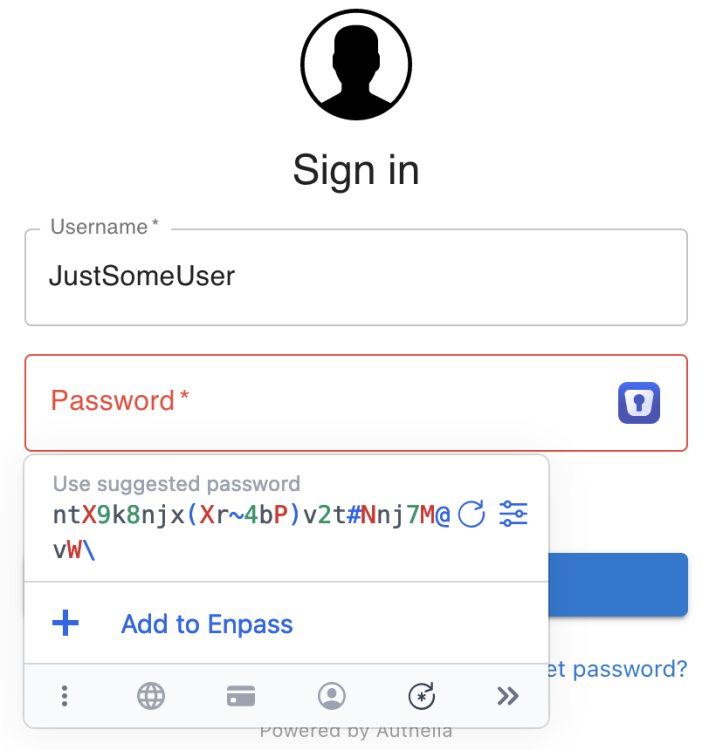
On most sites when I select a certain user, Enpass will fill both the username and the password. However with Authelia (https://www.authelia.com/) it seems like Enpass thinks the password field it's a "change password" field. Is there any way to fix this in the settings?
-