Carlos Flores
Members
-
Joined
-
Last visited
-
sweet, thx!
-
Carlos Flores changed their profile photo
-
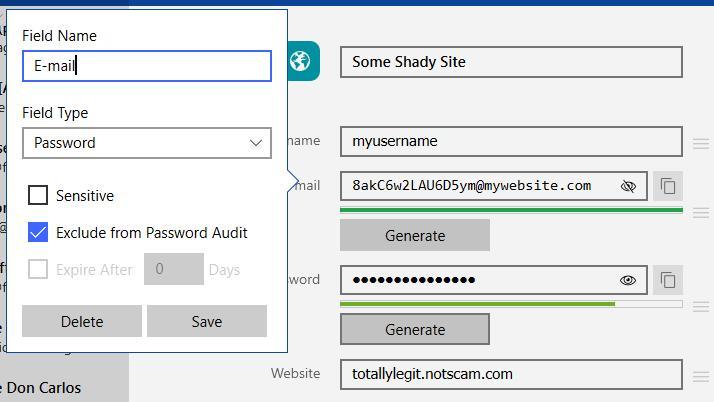
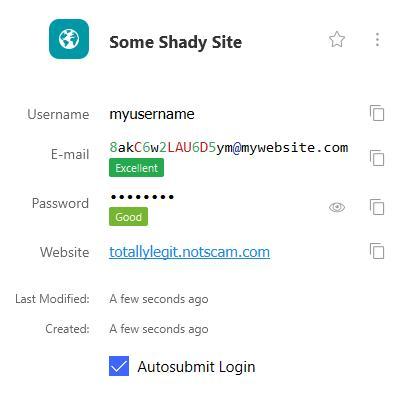
Sometimes when we want to create an account in some sites, we don't want to share our personal emails (thus ending in pwned lists). So a way to increate security by entropy is to never repeat an email. Apple is rolling out this on beta versions, basically you can create a random hash @ apple.me, and that is a forward to your personal email. Now, for those who we don't wanto to give apple all our data, I came out with a hacky solution: Change email to "password" type, remove "sensitive" and add "exclude from audit" (just for sanity check) Use the password generator to create a nice hash of characters and add @yourwebsite.com to form the email Have a catch-all email wildcard on yourwebsite.com, so any email that is not registered will be forwarded to your email I'm attaching two screenshots of the hack working Now a complete feature could be: A way to configure the website on the email generator (not a dealbreaker) Keep a log of what auto-generated emails were created to avoid reusing a hash (also not a deal breaker, but a nice add) Some eye candy on the displayed result and while creating the record Thanks in advance :)