Dekkia
-
Posts
3 -
Joined
-
Last visited
-
Days Won
1
Dekkia's Achievements

Newbie (1/14)
1
Reputation
-
Thanks for your reply! Now enpass works properly. Thank you!
- 3 replies
-
- 1
-

-
- windows 10
- crash
- (and 1 more)
-
Hello Again, This issue exists for me now for almost a week and there's no sign of sombody trying to help me. This is really annoying because I have to keep my old laptop around to look up passwords I need. I'm sorry for being rude, but I really want entpass to work on my laptop. I just switched to It a few months ago and I don't feel like switching to a different password-mananger again.
-
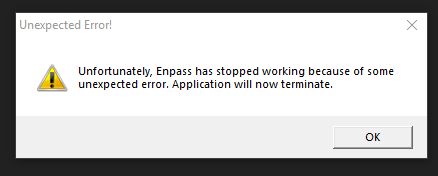
Hello, I migrated from Windows 7 to Windows 10 with Enpass. Enpass works after Installing it but refuses to start after that one time. As soon as I try to start it, this popup appears: And that's it. I'm on Windows 10 Education 17134.286. Enpass is on Version 5.6.9. I can't install the UWP-Version because the Windows Store is disabled using Group Policies on my Laptop. I also tried to use The portable version, but with no luck. Any help would be apreciated.