

Denoxster
-
Posts
5 -
Joined
-
Last visited
Denoxster's Achievements






-
Enpass Chrome Extension Flicker on Click
Denoxster replied to Denoxster's topic in Autofilling and Desktop Browser Extensions
The version of the Enpass app, OS, Enpass Extension and Chrome browser you are using. Chrome Version 106.0.5249.103, extension ver. 6.8.0, Enpass ver 6.8.3. Are you facing this issue on multiple browsers? I am exclusively using Chrome, this happened on both work and personal computer. -
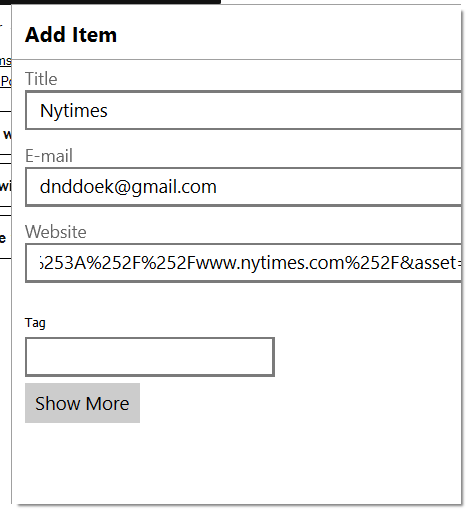
I have been having this issue for some times now. When Enpass extension icon on Chrome is clicked, it flashes and nothing opens up, it works again after computer restarted then it stopped working again, sometimes closing Chrome will get extension working again. When this happened, I noticed auto save window pop up it looks big, display in low resolution and I cannot see save button. Sample picture is uploaded. I have uninstalled/reinstalled extension as well as Enpass application, uninstalled/installed Chrome without any success. This also happening after I change a new computer. Any idea how to solve this issue?
-
Older IOS enpass6 was uninstalled as it crashing upon launching after later version installed this afternoon, I would like to use enpass6 data if possible as it has most updated data. Currently enpass6 also installed on my win10 laptop but Chrome browser extension broke today. What would be best way to restore using enpass6 data instead of 5?
-
Since enpass6 stopped working after latest version installed, I couldn't run backup as stated on link. Any other way such as moving the folder in google drive manually?
-
I was able to get it activate to full version after installing ver. 5 first but now when I try restoring data from google drive, it says "cannot find enpass data on this google drive account". I have both ver. 5 and beta data on google drive. Please help.