Search the Community
Showing results for tags 'cursor'.
Found 2 results
-
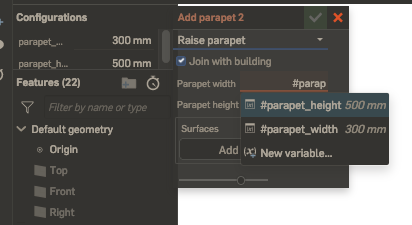
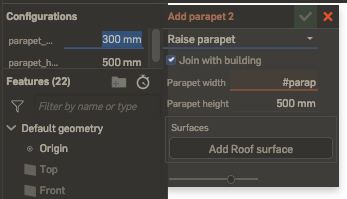
There is a bug where the Firefox Enpass Extension interferes with expected cursor behavior in the online CAD program Onshape. Onshape utilizes an autocomplete feature when filling out certain fields: Normally if a user presses "Enter", the highlighted recommended variable is pasted into the input field, and the user can continue typing in that field. As of approximately two weeks ago, this no longer works. When "Enter" is pressed, the cursor jumps to a different input field (highlighted blue below): The behavior is quite frustrating, as it means that the autocomplete function cannot be used. If the Enpass extension is disabled (and only that extension), the bug disappears. Why would Enpass be controlling cursor behavior on this page? It was my understanding that the extension does not take any action until its icon (top right-hand corner of the browser) is clicked.
-
keyboard enhacement request Basically I do not trust soft keyboards capturing everything including the Masterpassword and Pin and therefore set the Default Keyboard on my Android devices to Enpass keyboard. This works well for me, I do not require predictive typing or spelling, most of the time until I need to correct errors in whatever I am typing - trying to place the cursor in the correct location can be a nightmare. Now to my suggestion / wish. Would including an additional set of keys to move the cursor left or right be pratical? - perhaps at either end of the space key for example. The reason for this suggestion is because this feature exists in the 3rd party keyboard I use and is the only reason that forces me to switch out of Enpass keyboard - often I forget to swich back to the Enpass keyboard.

