Skip to content
View in the app

A better way to browse. Learn more.

Enpass Discussion Forum

A full-screen app on your home screen with push notifications, badges and more.

To install this app on iOS and iPadOS
  1. Tap the Share icon in Safari
  2. Scroll the menu and tap Add to Home Screen.
  3. Tap Add in the top-right corner.
To install this app on Android
  1. Tap the 3-dot menu (⋮) in the top-right corner of the browser.
  2. Tap Add to Home screen or Install app.
  3. Confirm by tapping Install.
  • Search By Tags

    Search will match any tag entered
  • Search By Author

Content Type

Forums

  • General discussion
    • Hot topics
    • Enpass Support & Troubleshooting
    • Registration and Purchases
    • Autofilling and Desktop Browser Extensions
    • Data Security
    • Announcements
  • Help us improve Enpass
    • Feature requests
    • Enpass Beta
    • Localization
  • General discussion

Find results in

Find results that contain...

Date Created

  • Start

    End

Last Updated

  • Start

    End


Filter by number of...

  • Minimum number of replies

  • Minimum number of views

Found 5 results

  1. Hi, When we use stickers to sort passwords; it goes to a point you try to manage that like folders. Unfortunately it's not the case... Yet ? Like this : It would be nice to have some equivalent functions like : * copy into (add sticker). * "move" entries from a sticker to another (replace the X sticker with Y) as it was folders Of course on mobile app it could be tricky to achieve. But on desktop computers. Definitely a must have. Have a nice day.
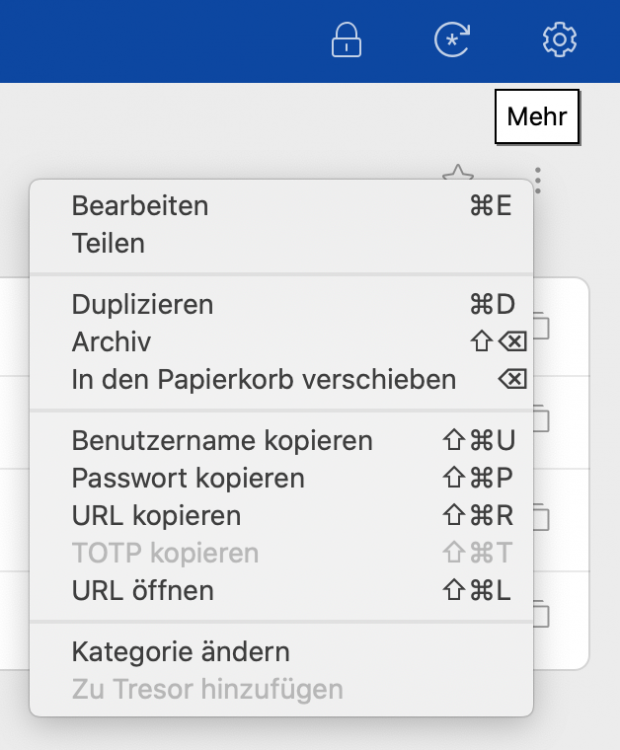
  2. If you have all vaults in Enpass selected, you currently cannot move or copy entries to other vaults (see disabled option in context menu "Zu Tresor hinzufügen"). If you have selected a single vault instead, you can move or copy to other vaults. This is something with low priority I guess, but may be changed quickly. Both technically and for usability, I don't see a reason for why this currently is as it is.
  3. I am using Enpass for one day and I still having an hard time figuring out, how to do basic stuff. How can I move Objects from one fault to another?
  4. pex posted a topic in Windows
    How can I move an existing item from one folder to a different already existing folder?
  5. Hi, Unless I'm mistaken, I didn't find how to move an item from a folder to another one (I'm using the Universal Application on Windows 10 and Windows 10 Mobile) Will you implement this functionlity to this version of Enpass ? Thanks

Account

Navigation

Search

Search

Configure browser push notifications

Chrome (Android)
  1. Tap the lock icon next to the address bar.
  2. Tap Permissions → Notifications.
  3. Adjust your preference.
Chrome (Desktop)
  1. Click the padlock icon in the address bar.
  2. Select Site settings.
  3. Find Notifications and adjust your preference.