

Leaderboard
-
JB Labelle
Members2Points28Posts -
edenhaus
Members1Points62Posts -
Yogesh Kumar
Enpass team member1Points53Posts -
Peter
Members1Points2Posts


Popular Content
Showing content with the highest reputation on 04/19/16 in all areas
-
2 pointsHello, on top of request for Identity / form filling in the browser extension (and waiting impatiently for Enpass to support Edge extensions coming), I would like to know if there is any plan to be able to have the website icon of an URL instead of the limited preselected icon offered ? It would be great if : - we could choose the icon of our choice - the browser extension would automatically store the website icon if available. Thanks for great GREAT work on the product.2 points
-
1 pointOption to store (and protect of course) Pictures - Photos or Images on Enpass Store pictures like "Secure Photo" (mimiking Secure Note) or something like that Store pictures as "New Items" ... when you add a new item, another in the list can be "Picture" But even more, every type of added element should allow to add a picture, that's useful for example for when you add a credit card, a club card, a check, a bill, a handwritten note... etc. maybe allowing to add it as a "custom field" thought "add new field" action.... there is a "Field Type" Thats my request1 point
-
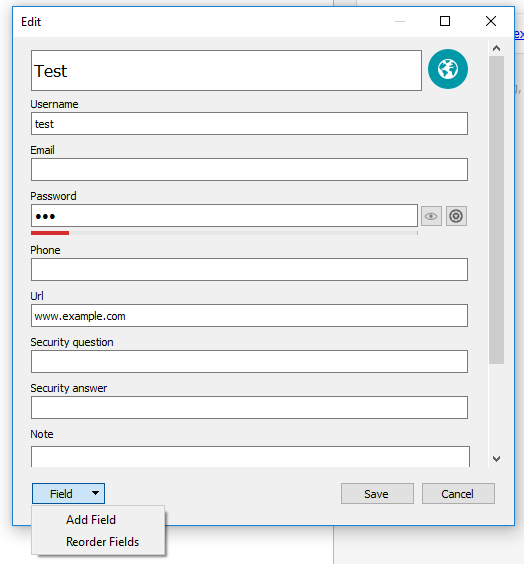
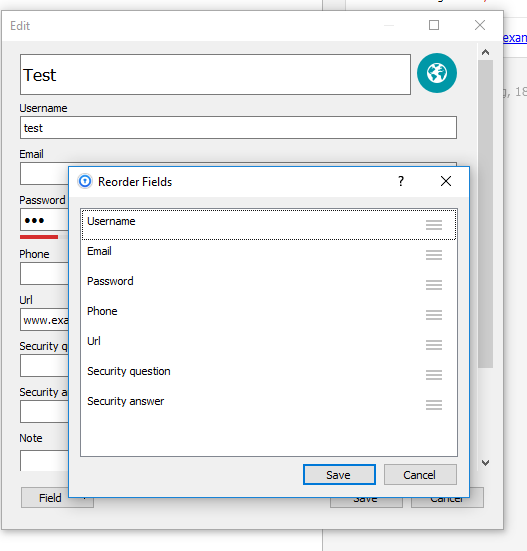
1 pointHi Chris, it's already possible. Give a look at -> https://www.enpass.io/docs/desktop-windows/customize.html#re-arranging-fields it's in the new version a little different and you have to first on "Field" and then on "Reorder Fields", but then you can order it as you want it. --> I hope, I have understand your problem correctly.
 1 point
 -
1 pointHi Plonqor, We are improving our extension scripts to solve such submit bugs in future versions. In the meanwhile there is no need to turn off the autosubmit of all pages as you can enable/disable auto-submit feature of specific item by going to its detail screen. Please refer to this user manual page here.1 point
-
1 pointFor the next Release it should be a must to have the possibility to store Attachments (PDFs etc) in the Vault. This Feature is very importent. A lot of alternate Passwort Manager can do this for a long Time ago. Thanks in Advance1 point
