Leaderboard
-
Tarun Singh Rawat
Enpass team member32Points351Posts -
Amandeep Kumar
Enpass team member18Points578Posts -
Syd
Members9Points33Posts -

AnakinCaesar
Members7Points160Posts




Popular Content
Showing content with the highest reputation since 06/12/25 in all areas
-
I do not like the new font spacing, nor the spacing of everything in general! I like to see as much data as I can on my screen, and now I get at least 20% less! Please add a way to put the spacing back! Looking at the Sections from Left to Right: Categories / Tags Visible | Item List Count Visible | Item Details Visible | v6.11.20 31 Visible | 15 Visible (same) | 19 (5 SECTION TITLES) Visible | v6.12 25 Visible | 15 Visible (same) | 15 (5 SECTION TITLES) Visible | The top Information Bar is also WAY TO BIG! Attached are a screen shot comparisons taken using the exact same dimensions. v6.11.20 v6.12.0 So far, I'm not liking the "improvements" at all. In addition to the Spacing being Way TOO BIG, and all the special highlighting of every row on the Item Details when moving your mouse over them is very distracting, and having to click the hamburger (3 little) dots to choose "copy"...now it's 2 clicks instead of just one. I'm not sure why you guys are messing with the already great UI you already have!!! I'm sure all the "under the hood" things are great, but please leave the UI as it is! Please put it back!

 4 points
 -
When I start Windows, Enpass 6.12.0 (2238) opens in my face on the desktop. Can I make it open discreetly minimized to the system tray like older versions did?3 points
-
3 pointsHey Enpass community! We’ve got something exciting to share - Enpass is getting a fresh new look, now more consistent with the Windows 11 experience. Plus, Enpass for Windows is now a native 64-bit and ARM64 app, bringing faster performance and improved memory usage. Everything you know and rely on works exactly the same, it just looks and feels a whole lot better. This is also just the beginning—Enpass for Mac with the all-new look lands in the next few days too! Here’s what’s new: A more modern visual refresh across the entire app Cleaner layouts and improved spacing throughout Refined icons, buttons, and text that feel sharper and more modern Every part of the app has been revamped- the sidebar, your item lists, item details, autofill, sharing, password generator, lock screen, and more Redesigned Settings More spacious and easier to read, so finding what you need is much more convenient. Everyday tasks feel smoother Things like adding items and importing data now take fewer steps. Get things done faster and more efficiently. And the most important part: it’s still the same Enpass you know and love. All your data and all your passwords remain secure and under the hood. We’ve just made everything nicer to look at and easier to use. Thanks for being a part of the Enpass community - you’re the reason we keep making it better. Check out the Beta version here and try out the new Enpass today. Note for Beta Testers Your data and settings will carry over automatically. Once updated, please take a moment to check that your vaults, items, and preferences are all in place. If you run into any issues, reach out to us at support@enpass.io. -The Enpass Team3 points
-
2 pointsPlease Add Option to have the NOTES FILED OPEN AUTOMATICALLY as with the previous Desktop App2 points
-
2 pointsHi, thanks! yes, like I said in the previous post, it's been partially fixed in 6.12.2: "The Notes fields stay expanded now, once expanded. They're still hidden after app relaunch though." Also, I'd like a QoL feature to disable the bright yellow color for the notes, it really is unnecessary, make it the same color as the rest of the window, the way it used to be. These are not "sticky notes", there is no reason for the notes field to be bright yellow. Both of the above are regressions of usability, it was fine before, there was no need to change these. Please consider fixing this also, thank you!2 points
-
Our technical team has already fixed the issue where custom section names are automatically capitalized on Windows. The fix is currently being prepared for release and will be included in an upcoming Enpass update.2 points
-
2 pointsI like the the new theme, it catches up the design from the initial simple UWP design language, also making the UIs of Linux and Windows more similar (you ditched dark theme for classic theme on windows few years ago for some reason) I still agree with @bu11etpr00f on the unnecessary extra click for Copy, and the expand button for Note fields seems unneeded too. Good job that you allow Notes to get more space when windows is maximized though. (once expanded). I do miss the one-column view that you got rid of (now you can only have a two or three column view) I would like to be able to to hide the menu-bar, it clutters the nice ui and I never use it.2 points
-
2 pointsHello together, come on, guys, it's Christmas. Time to make people happy! So please support a coammnd-line interface to get passwords from Enpass. I want to use only one tool.. and this should not be KeePassX. Releates to: December 24, 2018 September 10, 2018 May 3, 2017 November 21, 2017 Thanks and BR Daniel2 points
-
I can't believe it. Someone actually tackled the problem. And successfully, too! An update was released immediately: [UPGRADE] enpass:amd64 6.11.12.1953 -> 6.11.13.1957.It would be helpful if the key were installed directly in the correct directory. Here's how to do it without sudo: # curl -fsSL "https://apt.enpass.io/keys/enpass-linux.key" | gpg --quiet --dearmor | tee /usr/share/keyrings/enpass.gpg >/dev/nulland the source in the new DEB822 format: ~$ cat /etc/apt/sources.list.d/enpass.sources Types: deb URIs: https://apt.enpass.io/ Suites: stable Components: main Signed-By: /usr/share/keyrings/enpass.gpg2 points
-
When generating a password, the "Separated By" drop down allows us to choose one of several separators that will be used throughout the entire password. This functionality is good but I think it can be made better by adding a "multi" option that randomly picks a different separator character between each word. For example if the current separator is "Underscore" then the password would be "Correct_horse_battery_staple". Swiching to the "multi" option would result in a password like "Correct_horse,battery$staple", or "Correct-horse.battery staple" or "Correct$horse#battery_staple" etc.2 points
-
1password and bitwarden started integrated win11 passkey support. Is there any plan for enpass? https://techcommunity.microsoft.com/blog/windows-itpro-blog/windows-11-expands-passkey-manager-support/44675722 points
-
While I was a firm believer in Enpass for many years, recent developments have convinced me that this has turned into nothing more than a cash grab. The product is no longer user-oriented and shows little to no real focus on improvement. At this point, I honestly believe the software itself is essentially dead. Development feels stagnant, communication is minimal, and critical issues keep piling up without meaningful action. I can no longer recommend Enpass, even though I personally convinced more than six people to adopt it in the past. The way the “team” handles requests, bug reports, and improvement suggestions is simply unacceptable and, frankly, business-killing. I’m not even convinced there is a real team left, it feels more like a handful of people copy-pasting AI-generated responses. Letting something as basic as a signature expire only reinforces the impression that they no longer care. For users on a monthly subscription, my honest advice is to cancel and switch to an alternative. For those of us who paid for a “lifetime” license: I’m still trying to figure out how to get out of this without just writing it off as a loss.2 points
-
Team, Per the Title, Is it possible for the Enpass Team to add Proton Drive to the Cloud Sync services? I would love to be able to move my vaults over. Thanks again!!2 points
-
2 pointsThe recent addition of the PRF (Pseudo-Random Function) extension to FIDO, which enables symmetric encryption, is indeed a key milestone we were waiting for. With this in place, we are actively working toward adding USB security key / FIDO2 support, including YubiKeys, in Enpass. Our goal is to support hardware keys both as a master-passwordless authentication method and as a multi-factor authentication (MFA) option. While we don’t have an exact release date to share yet, our current plan is to introduce this support in Q2 of this year. We appreciate your patience and continued interest.2 points
-
2 pointshttps://blogs.windows.com/windowsdeveloper/2024/10/08/passkeys-on-windows-authenticate-seamlessly-with-passkey-providers/ It’s a shame that we still don’t have an API for passwords but at least the passkeys version is arriving. Can Enpass please consider implementing it?2 points
-
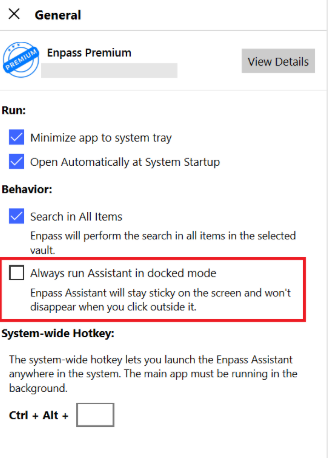
To make it easier for you to copy and paste your Username, Password, and other fields simultaneously, we recommend enabling the “Always open Assistant in Docked mode” option in Enpass General settings. By enabling this feature, the Enpass Assistant will remain visible in the foreground, allowing for a smoother and more efficient experience while filling in your credentials.
 2 points
 -
Thank you for reaching out. Ensuring your security is our top priority. We’ve released updates for all supported browsers starting with extension version 6.11.6. The issue has been confirmed as resolved by the original reporter (check the related blog post). To ensure your security, please update to the latest version (6.11.6) of the Enpass browser extension: https://www.enpass.io/downloads/2 points
-
We are excited to announce that we’ve addressed this issue in our latest Enpass macOS beta release: https://www.enpass.io/beta/ For the Enpass App Store version (requires macOS Monterey 12.0 or later), you can join our TestFlight program to access the beta. Alternatively, you can download the Website version of the Enpass macOS beta. Thank you for your patience, and we’ll notify you as soon as a stable update with the fix is officially released.2 points
-
Just updated to macOS Tahoe Beta 3 and enpass desktop doesn't work with this version either. Same symptoms and issues as Beta 2.2 points
-
I know it's bad manner to ask , but it's been like 2 weeks already , any update on this ?2 points
-
Our technical team is informed and is currently investigating the issue. We’ll update you as soon as we receive an update from them. #SI-44102 points
-
2 pointsOur technical team is addressing the issue. We appreciate your patience and understanding as we work toward a solution. While there is no confirmed release date yet, the fix will be rolled out as soon as it’s ready. #SI-39552 points
-
2 points
-
Just updated to macOS Tahoe Beta 3 and enpass desktop doesn't work with this version either. Same symptoms and issues as Beta 2.1 point
-
1 pointWe thank you for reporting the issue and it has been escalated to our technical team, and they're currently looking into it. We'll share updates as soon as we have more information. #SI-44301 point
-
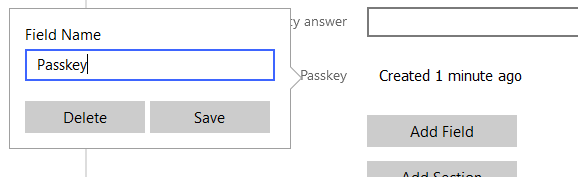
1 point1 pointReporting this here - hope developers can release a new version asap1 pointI'm running the latest beta 6.11.13 (2028) and it's working for me. You can get it on their beta web site https://www.enpass.io/beta/1 pointI'm running the latest beta 6.11.13 (2028) and it's working for me. You can get it on their beta web site https://www.enpass.io/beta/1 pointHi guys ! It would be awesome if I could choose the IP of the embeeded sync server. I want to use my tailscale IP instead of the local IP, So I could be able to sync my vaults through Internet.1 pointI also can't autofill passwords in the app from a website or other entry in enpass. The normal autofill feature for apps that support it works. But for apps that don't have this api, like spotify premium gratis apk, it doesn't work.1 pointPlan on using Firefox portable too, maybe, so if this ever happens again I can find the conflict or issue.1 pointI did try all of that. Was able to manage to fix it though. Not sure exactly how just reinstalled. Saw a place to get extension icon to appear so checked it off to be sure it happens this time. Now works great again. Thanks.1 pointEnpass - is there an update on this? Do you have a beta that we can try/test out?1 pointWhen installed, choosing iCloud as vault location, enpass can't login/authenticate to iCloud.1 point1 pointI only have 1 vault, so I do simply think the search field still contained data from my previous visit. Leaving data in that field might not be a good idea, but at least I now know to check it1 point1 pointWhile Enpass currently focuses solely on password management and does not offer alias or disposable email services, we truly appreciate the idea. Your input is valuable, and I’ve shared your suggestion with our product team for consideration in future updates. Integrating privacy-focused tools like this could indeed be a meaningful enhancement for many users.1 point1 pointHi Amandeep, If you read my initial post above you'll see that I'm not having any problems purchasing Premium. The problem I have is in the way we are being treated. Back when Enpass started, I, and many others, paid extra for what was called "lifetime Pro", which was the highest feature level. Now, instead of respecting the support we gave, and keeping us on the highest level, Enpass has created new levels (Personal & Family, and Business), and demoted our level (Pro) to BELOW the new ones, (ie we now lack new features), and expects us to pay again to get up to even the LOWEST of the new levels. Let me know if you don't understand the issue.1 point1 pointYou will need to edit the item for which you created the Passkey, click on the "Passkey" title, and then select "Delete." If the passkey is not appearing in the corresponding entry, please verify if the passkey was actually created for that item in Enpass.
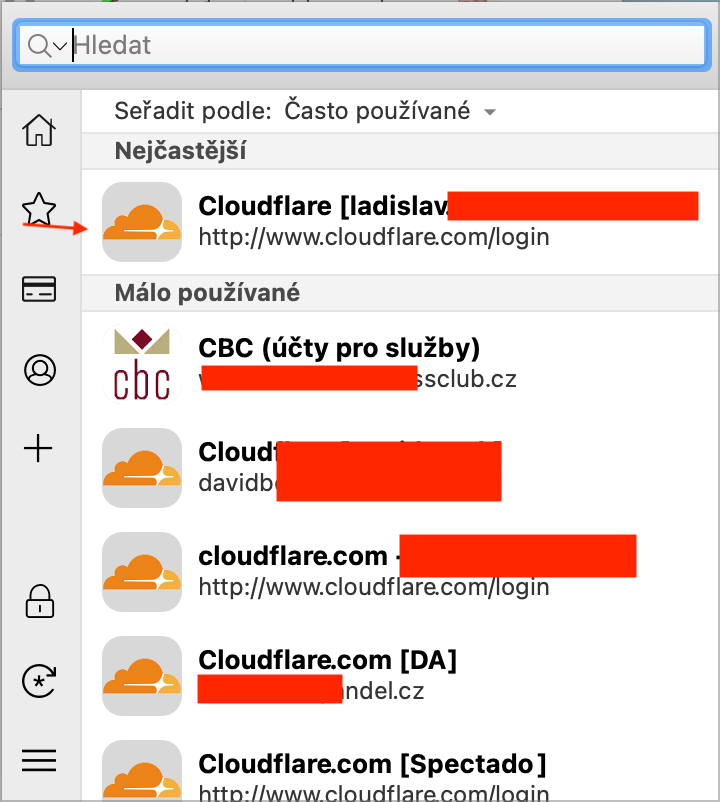
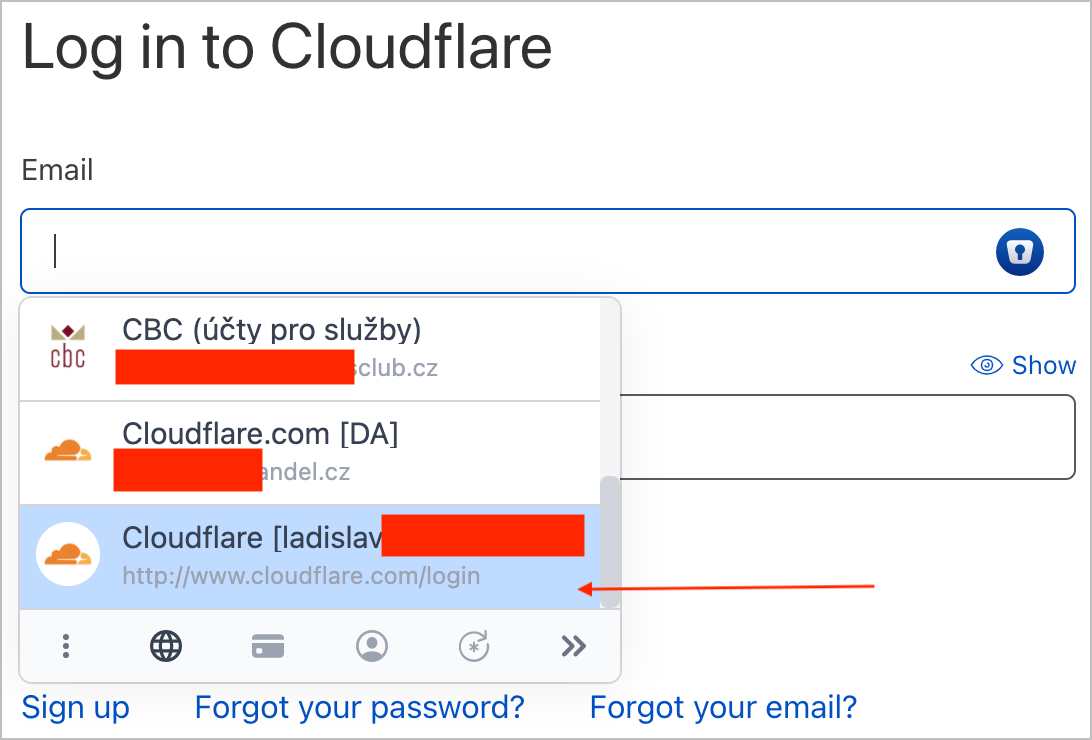
 1 pointHi, That's it ! When I setup the wifi sync, enpass select a local IP, but I want to choose my local Tailscale IP. I suppose you should adapt the UI to allow the user to select a local IP on the PC. I don't know how to explain much better sorry.1 pointHi, I do have similar "issue", but my main concern is, that the order in inline menu is different from the extension one. Funny is, that whats in top place of extension / app is last in the inline version. The order in the extension is most of the time OK as it accounts for usage frequency (or it seems like that), but in the inline filler, the most used accounts are almost always at the end of the list. Can you please at least use the same sorting on both places?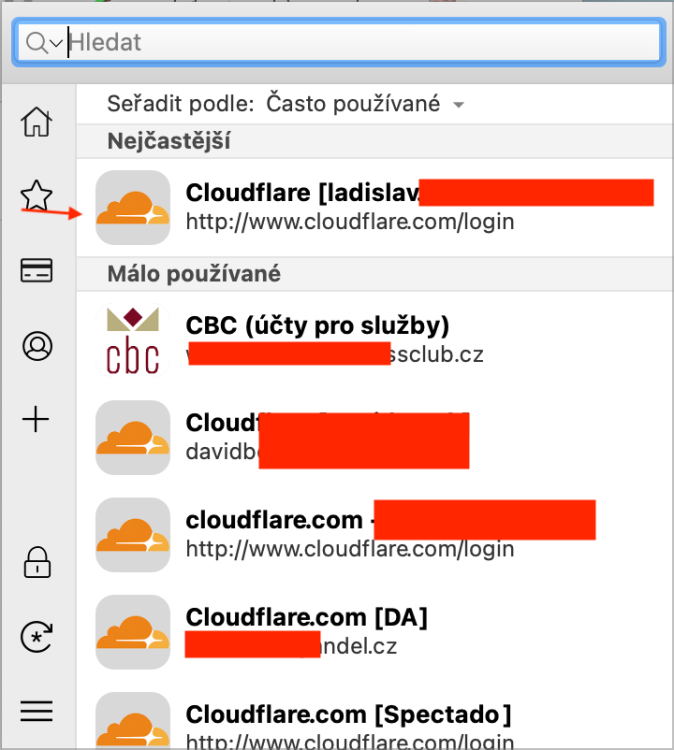
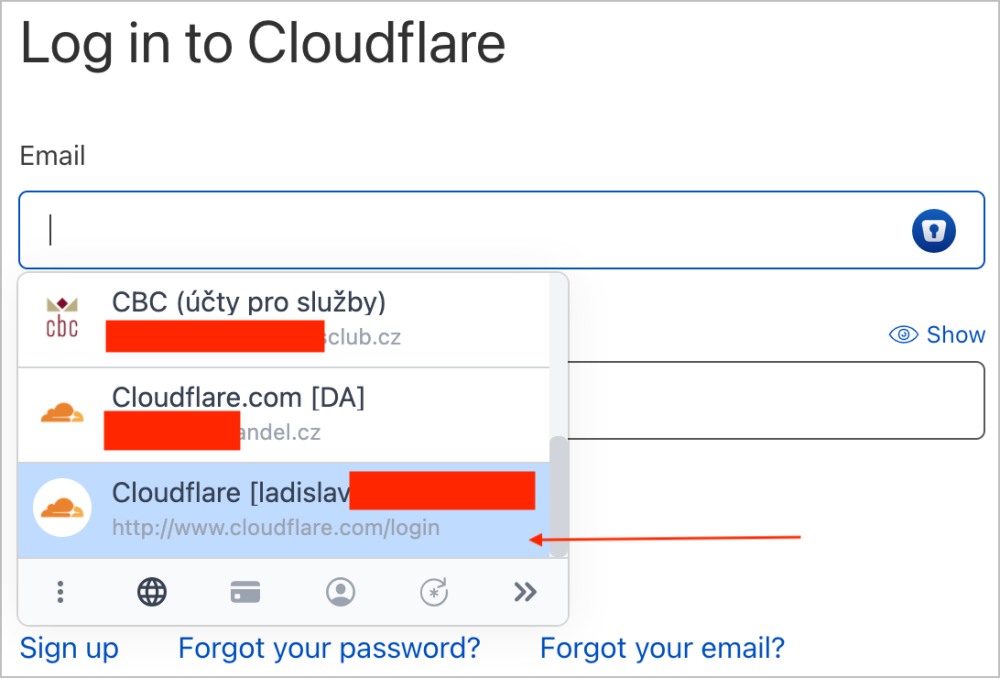 1 point1 point1 point1 point1 point1 pointbump Hi Enpass Team, I'd really like to see this feature too please.1 point1 point1 point1 pointRegarding this feature request, is there any information about whether the feature will be implemented?1 point



02.thumb.jpg.b647348f0496f3e3c241f66addfa3940.jpg)