


02.jpg.f635f356bbc89266167364036599c551.jpg)
Dypsis
Members
-
Joined
-
Last visited
Everything posted by Dypsis
-
-
I am using the Microsoft Store version of Enpass. I recently received an update to Enpass v6.12.0 (2238) from the Microsoft Store, which I think may be a beta version. If I decide that I no longer want to be part of the beta program anymore, what do I do?
-
-
-
Enpass just updated on my Windows 10 desktop computer, but it won't open. It just keeps crashing. Two crash reports have been sent. I think the new Enpass version that is failing to run on my Windows 10 computer is 6.12.0 (2238). Please help with this new version as soon as possible. If not, I'll have to revert to the previous version. Please assist me to do this, if necessary.
-
I'm being prompted to enter a 6 digit code that is supposed to be sent to my email address. I've tried resending the code a few times, but I don't receive an email. So, I'm locked out of my own account. I've checked and rechecked my junk folder. Nothing from Enpass. This isn't good enough when a user can't access their passwords.
-
This is still not fixed. 👇 Enpass System Tray Icon Position Forgotten & Doesn't Automatically Open After Every Update
-
Every time after Enpass is updated, the Enpass tray icon position is forgotten and I have to reset it. I first have to open Enpass, as it doesn't automatically open after an update. Then I have to go into Taskbar settings > Other System Tray Icons and select it in the Hidden Icon Menu. I then have to drag it to where it was before the update. I don't have this problem with other apps. Only Enpass has this issue.
-
I've had Pro from the start. I am now getting prompted to protect myself with Enpass Premium. I don't even see a Pro/Premium difference listed in pricing. I've just checked my Microsoft Store and PayPal receipts, and it says Premium.
-
I came here because I have the same issue. I've had Pro from the start. I am now getting prompted to protect myself with Enpass Premium. I've just checked my Microsoft Store and PayPal receipts, and it says Premium.
-
The new update is working.
-
Hi Amandeep. I've sent you a PM providing my email address for package flight access to Enpass Password Manager 6.11.1.
-
I'm starting to think that it would be safer to return to the legacy desktop app. When things go wrong with a modern UWP app, they can be very difficult to fix. Desktop apps are much easier to fix. This is not the first time that people have been locked out of Enpass with the modern app. Password managers need to be reliable.
-
I have the same problem on a Windows 10 computer since the last Microsoft Store update. It appears to open briefly, then closes or crashes. I tried a Repair and Reset, but it didn't work. I tried an uninstall, then reinstall, and that didn't work either. I've restored a system image and won't update it again until this problem is fixed.
-
I have this problem also with Firefox and Windows 11. Edit: I've since tried restarting Firefox, and its working so far. I'm not sure what broke it to begin with.
-
For you guys still having trouble. Have you tried rebooting? Have you tried updating the Microsoft Store? First close Enpass, if it's running.
-
-
-
If I can't be assured that this doesn't happen again, then I'm done with Enpass. This is simply not good enough for a password manager. We shouldn't need to rely on Windows store validation to access our passwords. I thought that the big feature of Enpass was that you could store your data offline and back it up to where you want. But now we're being held to ransom. NOT GOOD ENOUGH.
-
The silence from Enpass support is deafening.
-
-
Same here. I didn't see this thread at first. I posted about it over here. This is not good news. If its a password manager, you need to be able to rely on it.
-
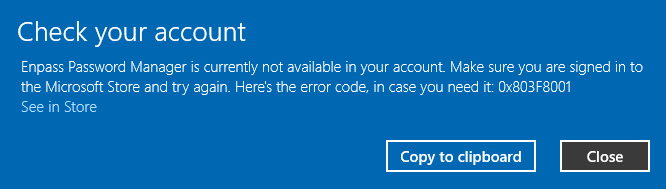
Hi. Something has gone wrong with Enpass today on my computers. It think it might be related to the latest Microsoft Store update. Below is the full error message.
-
-
That seems to have worked. Thank you, Discordant.
02.thumb.jpg.b647348f0496f3e3c241f66addfa3940.jpg)

