


TN_Dude
Members
-
Joined
-
Last visited
-
SOLVED! OK, the actual solution to the problem is as follows: When Ubuntu installed Enpass, it installed the SNAP version of the software. SNAP sandboxes the app, which prevents it from interacting with the browser (which is outside of that sandbox). The solution is to remove the Enpass version installed from the Ubuntu app store. Then go to the Enpass download page, select the Linux install. There it shows you how to install the debian version from the command line using the apt package manager (4 commands total to copy, paste, run). Once that is done, everything works like it should! Hopefully this can help others with the same problem.
-
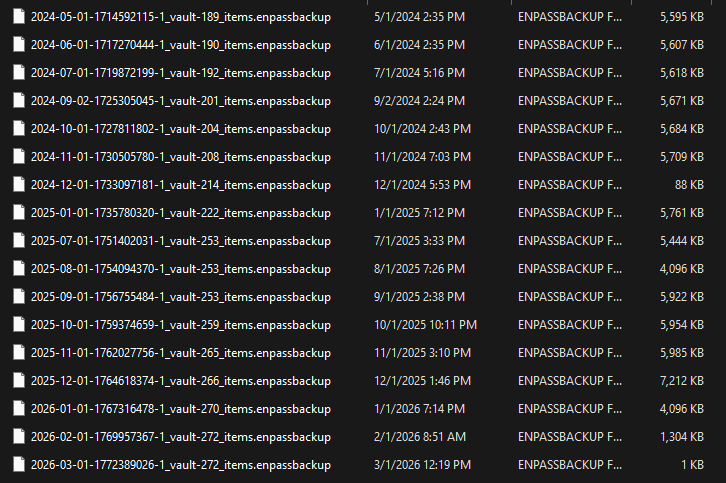
I'm in the process of moving to Linux from Windows and I was test to ensure Enpass would work on Linux. I tried restoring a back up from my Windows Enpass to the Linux Enpass and it told me my password wasn't valid. On Windows I have both the password and a key file, but Linux never asked about a key file. Would this be why the password was invalid? Then, I noticed my most recent backup was only 1kb in size. Looking at previous monthly backups I'm seeing a wide variety of size differences. If anything, the database should be getting larger, not smaller (and certainly not 1kb or even 88kb as seen in the attached image). It is very scary that my backups might be corrupt. I'm glad I caught this before actually needing it! I just reran the backup and this time the file size was 9,259kb - almost double even the average previous backups. Has anyone seen the same thing as me? Any suggestions? EDIT: I re-backed up Enpass on Windows, then reinstalled Enpass on Linux. This time, I was successful in entering the password AND key file (it asked for it this time). I suspect the file I tried to restore was corrupt and that is why the password wasn't accepted and no key file was asked for in my original attempt. Also, I found the reason the 2026-03-01 backup was only 1kb was because my Versacrypt volume was full. The volume being full might be the problem starting on 202601 too, where each successive month the file got smaller maybe due to it running out of space???? EDIT 2: I wrote a Python script to check the backup files to see if valid. The files are zip files (though no zip extension). Within the zip there is a root directory and within it a directory name primary (I suspect that depends on what the individual named their vault). In the root there should be a file named "backup.info". This states whether there is a key file required. Within the primary directory are two files named "vault.json" and "vault.enpassdb". I check for the presence of those 3 files to determine whether the backup was valid or not. 5 files were missing one or more of those files.
-
-
-
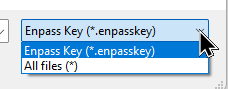
I replied last year saying that I could use any extension whilst in Windows 11. Recently I installed Ubuntu and you have to have the enpasskey extension. BTW, in Windows, it'd be great if the select file dropdown's default was "all files" rather than ".enpasskey" (the reverse of today's default as seen in my image a few posts up). While not optimal, security by obscurity is still better than advertising your 2nd factor security, and would be easier to use with a different extension.
-
-
Hi all, I'm in the process of migrating from Windows 11 (where Enpass works as expected) to Ubuntu (latest version). I installed Enpass, loaded a backup of my passwords, added the Enpass extension to Brave, and enabled browser extensions. When I get to a login page, the Enpass icon doesn't appear nor does an entry matching the url(s). The only way I can fill in the password is by manually copying the username and password from Enpass after I find the appropriate login. Any suggestions for things to fix?
-
Given that it would be a simple toggle, the user could opt to never use it. Or, in my case, where I'm using it on my home PC, it wouldn't be a security concern. Plenty of security related software allows toggling the visibility to make sure you didn't fat finger your password. Regardless, thanks for forwarding this on.
-
Please add the option to view the password you entered on the login to Enpass screen. Often when logging in, I enter the incorrect password and can't see what I entered.
-
I just installed MalwareBytes Firewall Controller and am seeing an attempted outgoing connection to Akamai via a powershell script. Does Enpass use those two technologies?
-
I'm using Enpass on Windows 11 and it does not require a .enpasskey extension. The dropdown for selecting the key file gives the default option of .enpasskey or All files (*). I'm currently using a file with an extension that is not .enpasskey. I do wish the dropdown would eliminate the .enpasskey extension and just have the All Files (*) option.
-
I don't rely or even look at what Enpass or any other site tells me is "good enough". With computers getting faster and clusters of computers getting cheaper, those suggestions have a relatively short expiration date. Over time, what was once "good enough" no longer is. I'm using a long password and letting Enpass keep track of it (meaning I don't care that it might be longer than necessary). I'm going with passwords that should be good for the foreseeable future, if not my lifetime.
-
Do you have enough disk space to export to? I ran into that problem.
-
It sounds like you are seeking permission to use weak passwords. I grant you permission. The point of password managers is to use the most secure passwords possible. I, for example, make mine 40 characters with all character types included in its construction. I do that because I don't have to type them in. That is the password manager's job. For the few passwords I might have to type in (such as my Chromebook password), I use a passphrase with enough words for at least 30 characters, but that is easy to type and remember. It sounds like your use case would be better served by Bitwarden or Proton Pass where there is access to your vault via their web page. When on another person's computer, you'd simply have to log in (using the memorable passphrase I mentioned above), then you'd have access to your passwords that you could copy/paste. I was a LastPass user when their vault was stolen. That taught me a valuable lesson about secure passwords. As such, I appreciate that Enpass is entirely self hosted. I do use Proton Pass for non-financial passwords that can be shared and that wouldn't damage me if stolen/hacked (such as Facebook, forums, news sites, etc.).
-
I'd love to see a setting added that would allow capturing the URL where only the domain is saved. An example would be something where a URL's domain was followed by something like: /en/login/oauth?bla would only save the domain in the login's URL field. Likewise, when you are resetting a password and Enpass sees the password and URL changed (because the password change URL often has a bunch of rubbish following the domain), it'd save just the domain to the login's URL field. As an added request, if the URL of the page you are on doesn't match the URL in the URL field, it'd be nice if it asked if you wanted to add a second URL rather than overwriting the current URL. NOTE: I tried using actual URLs for examples but doing so gets my post rejected as spam.
