

Leaderboard
-
Victor Chu
Members2Points14Posts -
edenhaus
Members1Points62Posts -

Binh Truong
Members1Points56Posts -
Ankur Gupta
Enpass team member1Points98Posts




Popular Content
Showing content with the highest reputation on 04/20/16 in all areas
-
when making a new registration from browser plugin it will be useful to let user to choose Enpass folder to save to.2 points
-
In my case, I need to move items from Password category and my folder into Login category because the TOTP field only shows in Login category so I have to open Desktop version. I hope version UWP will allow to move items between categories and TOTP field can shows with other categories instead of Login category only1 point
-
Yes thats great but it would be greater to access the enpass menu bar icon by shutcut. For example: the Mac AppStore asks me for my password, i press alt + Space (for example) the enpass menu is comming up end i can directly start typing "iTunes" and select/copy the password by keyboard. Everything without using the mouse.1 point
-
1 pointHello, Thanks for your suggestions. These are among the most demanding features from our users and in our pipeline for development. Identity filling has already been implemented whereas we are near to start working on custom and rich icons. After some of the coming major updates, we will start working on it and will deliver really fast. Thanks.1 point
-
Yes. I think Enpass should change in next version when Enpass embed TOTP for Windows 101 point
-
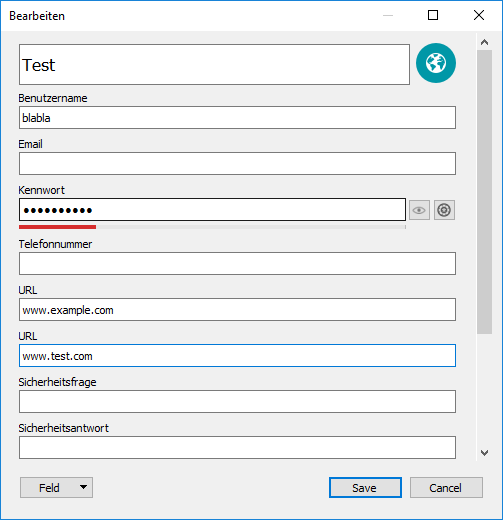
1 pointSo far I have done it in this way: Add a new Field Select Type URL and Name it Add the URL in the new created Field Afterwards it looks similar to the screenshot below Cheers, edenhaus
 1 point
 -
-1 pointsWith my opinion then Enpass should not support this feature, they should create new product. I only save password, info, note... so I like small size for upload/download from/to cloud. If we need save image then we can save into cloud or zip with protected password and save that password into Enpass.-1 points
