

Leaderboard
-
ussamkusser
Members1Points2Posts -
Dom
Members1Points8Posts -
Balu
Members1Points3Posts -
AndyMac
Members1Points41Posts




Popular Content
Showing content with the highest reputation on 05/08/17 in all areas
-
Hello @Anshu kum, thanks for your very fast response and the good news that a new portable version is coming soon1 point
-
1 pointSame here, to make it work again I had to go into "Preferences -> Browser" on Enpass, and uncheck "Verify browsers". Apparently this only happens on Chrome (tried to reinstall it on stable, beta and canary, but no luck), I got no issues on Safari or Firefox.
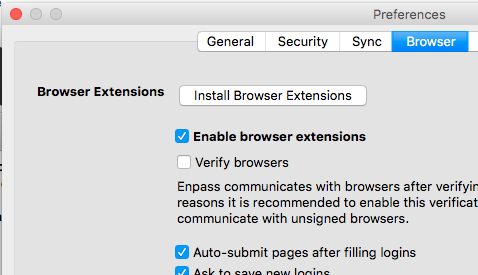 1 point
 -
Yes, it would be good to hear an update on this. Ideally supported by both the UWP app and the desktop app (maybe using the Desktop Bridge if that would provide the way for it to communicate with Edge).1 point
-
Any news about the Edge browser Extension? Or will this never comes in the near future?1 point
-
1 pointLOL You guys are so funny to call that feature "autofill". Haha. You know what? My computer has this great feature calle "auto-everything". It can do everything automatically. Really! I just have to press some keys and do some clicks and boom!, it does it all by itself! Even this message was composed with this function. It's so great! I didn't have to do anything (except for pressing some keys). Anyway! I'm staying with KeePass. It's entirely free and better (except for the UI design) and more configurable and ...1 point
