Leaderboard
-

Mohammed Anzil
Members2Points6Posts -

INTRASERVER
Members2Points8Posts -
Ivarson
Members1Points291Posts -
kos1958
Members1Points3Posts




Popular Content
Showing content with the highest reputation on 01/14/22 in all areas
-
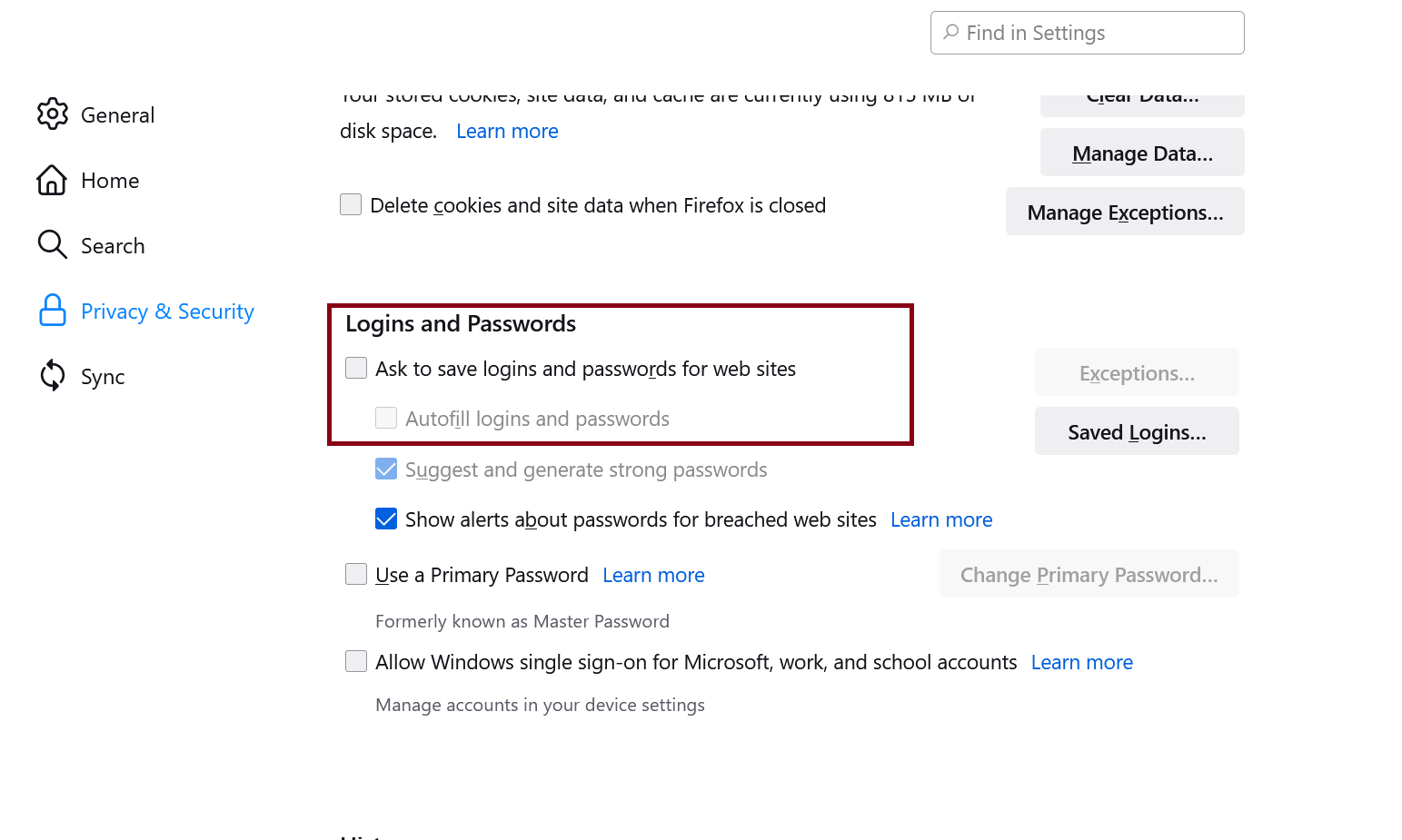
Heelo all. I'm glad to switch to Enpass and even I had some issues, but almost I resolved and still best alternative to 1Password. (I switched from 1Password.) So one more issue came up with Enpass, it doesn't work with Firefox very well. I spot, if you have enabled Firefox Settings > Privacy And Security > Ask to save logins and passwords for web sites & Autofill logins and passwords then Enpass conflict with those and not fill up fields. If you turn off then it works. Please fix it. I know can be managed to work together (1Password does without issues.)
 1 point
 -
I'm using Traffic Monitor. You can get it from here: Link is here1 point
-
1 point
-
1 pointThat feature has been in Enpass for quite some time.. https://www.enpass.io/docs/manual-desktop/share.html1 point
-
1 point
-
1 point