mad99
Members
-
Joined
-
Last visited
-
Thank you @Pratyush Sharma, If you know it, it's totally easy! You were 100% right. The DownloadSource was the reason. I had Installed from AppStore not with Web-Download. Thank you very much for help! Because you are batched by «ENPASS TEAM» some following question/thoughts: Why there are differences although the version-identifiers (6.6.0) is the same? Normally, the app from AppStore seams to be «more secure». Would be great, the differences from AppStore <-> WebDownloadwere be published. Currently without SHA/MD5 hash without knowing there are differences (same version in the install-overview), I would always prefer the AppStore «by default». Maybe this will help other on the same way, searching the difference between documentation/realLive. Best regards Martin
-
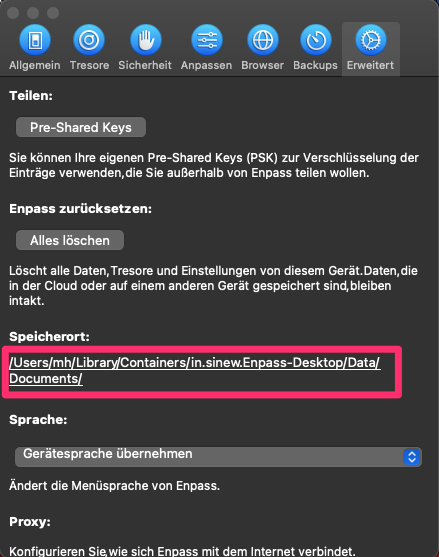
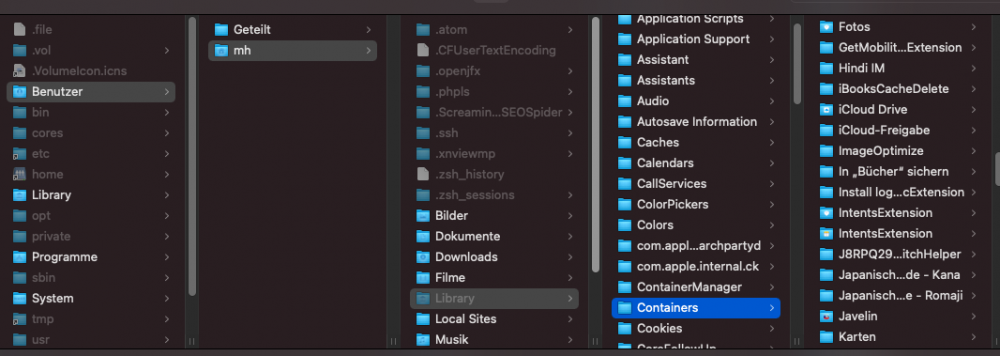
Hi, Does anybody know a solution to store the default path to the storage-folder from Enpass in macOS Big Sur? By default there is created a folder under ~/Documents. This Folder is not «moveable» by drag & drop. And I don't like to do it with Terminal, because it could cause problems. Unfortunately the storage-place (storage-folder in German Speicherort) is set to a folder that not exist. And when I click on the underlined link, a finder popsup with the path: User/mh/Documents/Enpass. Maybe this «wrong» path is some old-stuff from before the upgrade to big sur (from Mojave install). So I uninstall the hole EnpassApp with AppCleaner and reinstall it. No difference. Then I use also «Delete all». No change.... I read in the documentation, the path is changeable by clicking on «change location». But I can't find the button. And when I click on the «location-path» (Speicherort) the finder pops no possibility to change and also no right-click contextual-menu to find. Would be great to get help to change the directory out from the root-folder in «Documents». We have an internal hirarchiecal solution for folder-structure. The Enpass folder does not match in the default place. Does anybody has a solution for this need to «move the location of the Enpass-Folder»? Is that possible at all? Do I have to delete some deeper preferences-/system-stuff? Or any help, if I misunderstood something basic? Thanks for help Martin