

Skip to content
View in the app

A better way to browse. Learn more.

Enpass Discussion Forum

A full-screen app on your home screen with push notifications, badges and more.

To install this app on iOS and iPadOS
  1. Tap the Share icon in Safari
  2. Scroll the menu and tap Add to Home Screen.
  3. Tap Add in the top-right corner.
To install this app on Android
  1. Tap the 3-dot menu (⋮) in the top-right corner of the browser.
  2. Tap Add to Home screen or Install app.
  3. Confirm by tapping Install.

mnag2911

Members
  • Joined

  • Last visited

  1. No Problem at all. I have re-installed the enpass program via Windows APP-Store, but the problem still exists. Yes, enpass was installed on this system a few weeks ago and everything works fine. Any suggestions ? Regards Michael
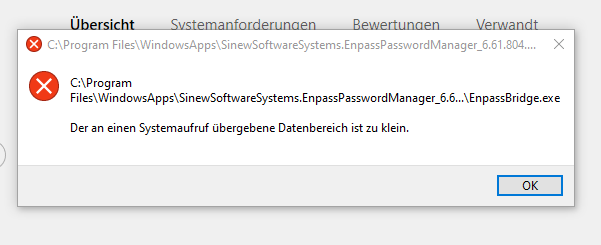
  2. Guten Morgen, vielleicht kann mir jemand im Forum helfen. Start von Enpass unter Windows 10 nicht möglich, dieim Anhang angegebene Fehlermeldung erscheint. Was tun ? Grüße Michael
Account

Navigation

Search

Search

Configure browser push notifications

Chrome (Android)
  1. Tap the lock icon next to the address bar.
  2. Tap Permissions → Notifications.
  3. Adjust your preference.
Chrome (Desktop)
  1. Click the padlock icon in the address bar.
  2. Select Site settings.
  3. Find Notifications and adjust your preference.