Phil0r
Members
-
Joined
-
Last visited
-
Hi, thanks a lot for your reply! That's interesting, as I did not (on purpose) load a beta version but updated from my older version via the AppStore. However, I just solved the issue the following way: I uninstalled the problematic Enpass 6.7.0 (876) version (via AppCleaner) and re-installed it via the AppStore. Now I have version 6.7.1 (878) (released later the day I installed 876), in which the sync-server can be successfully started. I am not sure if it was due to the re-installation or the fact that I now have an even newer software version. In case someone else has that issue, re-installing should probably fix it. Thanks again, Phil
-
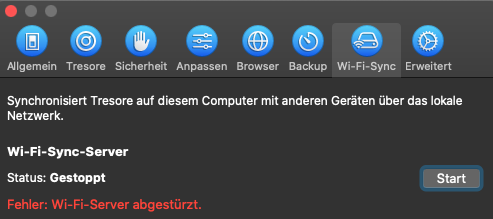
First of all I'm super happy about the local wifi sync feature finally being added to Enpass. Unfortunately, after I wanted to start the Wi-Fi-Sync-Server (Preferences -> Wi-Fi-Sync), it instead tells me "Error: Wi-Fi-Server crashed". I'm running Enpass 6.7.0 (876) on a MacBook Pro (Mid 2012) under macOS Catalina 10.15.6 with currently no FireWall activated. Other apps as PDF Expert are able to host a server on my mac for iOS transfer, so it shouldn't be a general issue. Thanks a lot in advance for your help! Cheers, Phil