David321
Members
-
Joined
-
Last visited
-
I have to do a clean install of macOS. Doing so will erase all my data. I can't simply upload it to an external drive and then reload it after the clean install because, due to possible malware on my current system, I will have to reenter all my data manually. IS IT POSSIBLE TO DOWNLOAD MY ENPASS DATA INTO A PDF (or something similar) AND PRINT IT? Please help.
-
I must have a credit card stored somewhere on Enpass because I just renewed my Premium subscription by tapping a button in the Enpass app on my iPhone. Where can I access my credit card info? I may need to change which card I use for renewals.
-
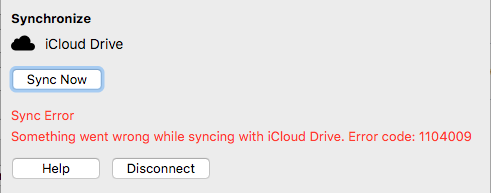
I've had no trouble with syncing over iCloud Drive until today. Earlier today I was forced to create a new password for my iCloud Drive account. Now the Enpass app will not sync across my iPhone & iPad. When I try to do a manual sync I get an error code - 1104009 Do I need to update the iCloud password in the Enpass app? How is that done? I tried disconnecting from iCoud Drive and reconnecting but I still get the error code.