


MerchAndDice
Members
-
Joined
-
Last visited
-
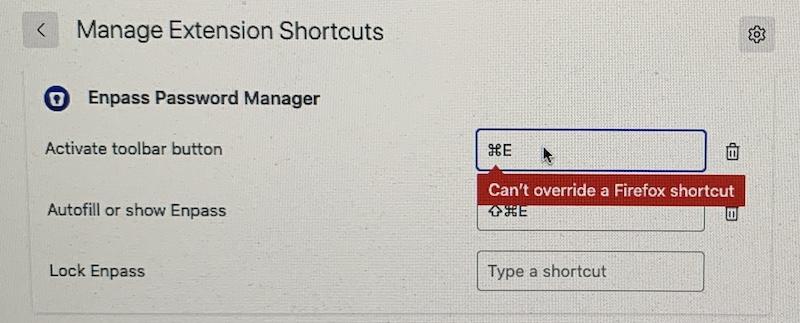
Using "Ctrl + Shift + ." shortcut might be related to Multi Account Containers that you linked to. Not being able to set autofill shortcut to be "Ctrl + /", it's Enpass, not Firefox. What bothers me with this behaviour is that Enpass has made it so that Firefox (or any other browser) default keyboard shortcuts are not permitted anymore to be used as a Enpass keyboard shortcut and these settings are hardcoded to new version of Enpass Extension. What Enpass should do instead, is to check system keyboard bingings in Firefox (and other browsers) since in macOS at least you can alter every possible keyboard shortcut to be something else. In my case, I have defined Firefox default "⌘ + e" shortcut action to have other shortcut in order to free that key combination "⌘ + e" to be used as a Enpass shortcut for autofill in Firefox. Safari has no use for "⌘ + e" shortcut by default so it still works in there but not in Firefox anymore and would appreciate universal solution across these two browsers. As others have stated, I've also developed muscle memory to fill in password with my chosen keyboard shortcut after years of usage and find it disturbingly worrying that these kind of changes to basic behaviour of autofill are dropped without A SINGLE NOTICE to users. Not to mention the fact that Enpass's life long default key combination "⌘ + /" is not working anymore. Hilarious. New version of Enpass Extension cannot use Firefox default key combinations as a shortcut, even though it has no functionality binded in to it whatsoever at least in my case.
-
What bothers me with this behaviour is that Enpass has made it so, that Firefox default keyboard shortcuts are not permitted anymore to be used as a Enpass keyboard shortcut, and these settings are hardcoded to new version of Enpass. What Enpass should do instead, is to check system keyboard bingings in Firefox (and other browsers) since in macOS at least you can alter every possible keyboard shortcut to be something else. In my case, I have defined Firefox default "⌘ + e" shortcut to be something else in order to free that key combination to be used as a Enpass shortcut for autofill. Now with new version of Enpass this key combination cannot be used anymore because it is Firefox default key combination, even though it has no functionality binded in to it. This happened to me before I updated to Firefox 94.01 so this must be due to Enpass, not Firefox.
