etroska
Members
-
Joined
-
Last visited
-
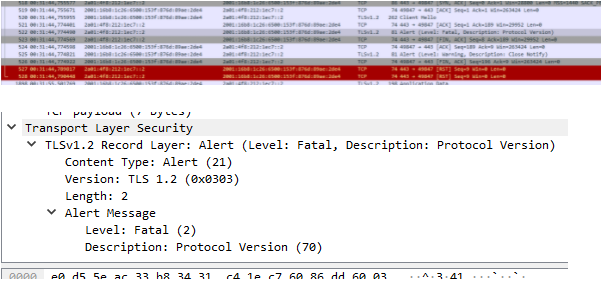
Ok. I found the Problem. In short; Enpass is not able to communicate with TLS1.3 Webdav shares. I thought that already, and I changed the virtual host in my nginx configuration to TLS1.2. After that, the webdav share was still not able to connect. Now we come to the part that I don't know yet: I had two configuration files in my nginx reverse Proxy: [root@server ~]# ls -1 /etc/nginx/conf.d/ 01-website.conf 02-nextcloud.conf In the 01-website.conf file, I set the TLS setting to tls1.3: ssl_protocols TLSv1.3; In the 02-nextcloud.conf file, which is responsible for my nextcloud instance, I set version 1.3 and 1.2: ssl_protocols TLSv1.3 TLSv1.2; Now I thought, that the virtual server for nextcloud is able to communicate with TLSv1.3 and TLSv1.2. But this is unfortunately wrong. Nginx takes the first configuration file, in my case 01-website.conf, and enabled only TLSv1.3. All other methods are disabled now for all virtual hosts. I thought, that the server name indication ensured, that nginx will offer the settings (TLS1.2) from my 02-nextcloud.conf. But I think, that the server name indication will take effect after the first TLS connection. So the only available TLS version is TLSv1.3. What I did: I created a new file 00-defaults.conf and enabled TLSv1.2 and TLS1.3. In the 01-website.conf I enabled only TLSv1.3 In the 02-nextcloud.conf I enabled TLSv1.2 and TLS1.3. Now I was able to connect via TLSv1.2 against the nextcloud virtual host and the webdav sync worked. Cheers, Etroska
-
Hi @Gulshan Dogra, Do you have new information about this enpass problem? cheers and merry Christmas, Etroska
-
Hi @Gulshan Dogra, On my Desktop PC I use Windows 10. My mobile device (same error) uses an iOS 15. I emailed you.
-
Hello, I use Enpass with version 6.7.4 (933) and as Webdav share I use a Nextcloud version 23.0.0. The problem is, it is not possible to sync the shares. Enpass always said, that I should check my username and my password. So I debugged a bit and found out, that the share is easy to mount with a linux webdav client. Now I dived deeper: I checked the server side and found out, that there are no requests from my enpass client to my nginx reverse proxy (checked the access logs). I started a sniffer on my client site, and saw the following output: This looks like, that the client is not able to create a TLS connection. Maybe the ciphers are too strong? The logfiles in enpass are a bit confusing: Info: [HTTP] CURLSSLOPT_NO_REVOKE Info: [HTTP] Using AUTO Proxy detection Info: [HttpClient] https://nextcloud.lasse-wackers.de/remote.php/dav/files/lasse/ curlresultcode: 35 responseheaders: Info: [HTTP] CURLE_SSL_CONNECT_ERROR try again Info: [HTTP] ****Unable to verify server certificate ***** Info: [HTTP] CURLSSLOPT_NO_REVOKE Info: [HTTP] Using AUTO Proxy detection Info: [HttpClient] https://nextcloud.lasse-wackers.de/remote.php/dav/files/lasse/ curlresultcode: 35 responseheaders: Info: [HTTP] CURLE_SSL_CONNECT_ERROR try again Info: [HTTP] ****Unable to verify server certificate ***** Info: [HTTP] CURLSSLOPT_NO_REVOKE Info: [HTTP] Using AUTO Proxy detection Info: [HttpClient] https://nextcloud.lasse-wackers.de/remote.php/dav/files/lasse/ curlresultcode: 35 responseheaders: Info: [HTTP] CURLE_SSL_CONNECT_ERROR try again Info: [HTTP] ****Unable to verify server certificate ***** Info: [HTTP] CURLSSLOPT_NO_REVOKE Info: [HTTP] Using AUTO Proxy detection Info: [HttpClient] https://nextcloud.lasse-wackers.de/remote.php/dav/files/lasse/ curlresultcode: 35 responseheaders: Info: [HTTP] CURLE_SSL_CONNECT_ERROR try again Info: [HTTP] ****Unable to verify server certificate ***** It is confusing because the certificate is valid and the reason, why the TLS connection cannot be established, is not the certificate. Is there anyone who has an idea? Cheers, Etroska