

Skip to content
View in the app

A better way to browse. Learn more.

Enpass Discussion Forum

A full-screen app on your home screen with push notifications, badges and more.

To install this app on iOS and iPadOS
  1. Tap the Share icon in Safari
  2. Scroll the menu and tap Add to Home Screen.
  3. Tap Add in the top-right corner.
To install this app on Android
  1. Tap the 3-dot menu (⋮) in the top-right corner of the browser.
  2. Tap Add to Home screen or Install app.
  3. Confirm by tapping Install.

metropical

Members
  • Joined

  • Last visited

  1. really? does this mean enpass doesn't sync yet in macos?
  2. both macs have the same version, 6.9.2, but are on diff OS, if that matters. Both are on same local wifi. Firewall is set to pass Enpass data. But the method to sync as described on the webpage goes nowhere. Neither install sees the other vault. What am I doing wrong.?
  3. figured it out. some background app was preventing it. I disabled a few login items. Unfortunately, I didn't track them to see which was the cause. But Enpass seems to be working OK now.
  4. Hi Gulshan, Thanks for the continued help. moved the Enpass folder to Downloads folder. I don't run any Enpass extensions and double checked with Activity Monitor that no instance of Enpass was running. Launched Enpass and it froze in the same manner .
  5. if I could launch I could tell you, but I'd guess less than 100. heh, heh, heh, what's a vault? I haven't added any vaults that I'm aware of. The files are backed up with Tresorit, but not "sync'd" per se. Other than that they are backed up locally with Carbon Copy Cloner, but not to a cloud.
  6. website not a browser ext. app only. if it matters, MacBook Air on High Sierra
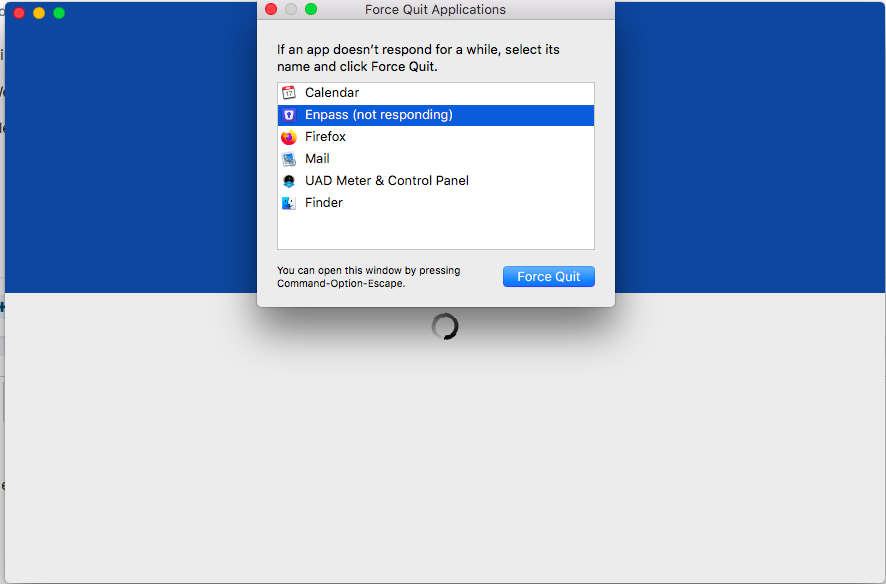
  7. spinning rainbow goes nowhere.

Account

Navigation

Search

Search

Configure browser push notifications

Chrome (Android)
  1. Tap the lock icon next to the address bar.
  2. Tap Permissions → Notifications.
  3. Adjust your preference.
Chrome (Desktop)
  1. Click the padlock icon in the address bar.
  2. Select Site settings.
  3. Find Notifications and adjust your preference.
