


Gerhard
Members
-
Joined
-
Last visited
Everything posted by Gerhard
-
P.S.: with logs as text attached, the forum does not allow to post the entry -> spam... Therefore attached as picture.
-
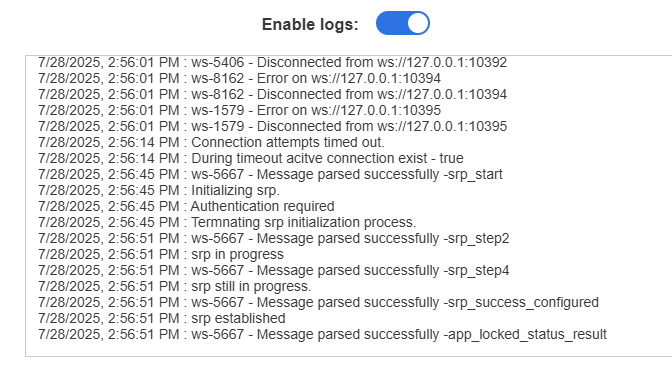
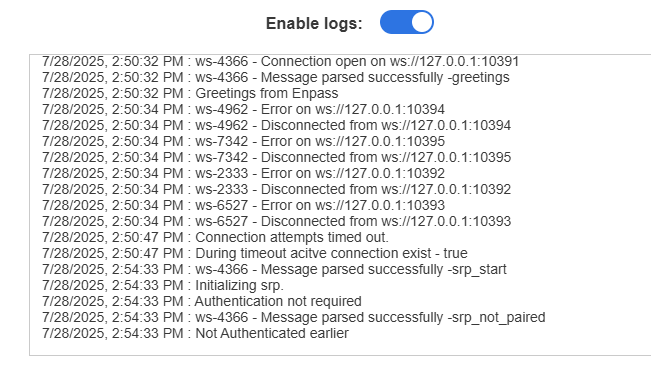
Since the last 2 or 3 updates, I have the issue on 2 different laptops (both from Lenovo, but different model), that the Edge browser asks multiple times per day for authentication. The browser review in the settings shows multiple entries for "C:\Program Files (x86)\Microsoft\Edge\Application\msedge.exe" The setting to require for every login browser authentication is disabled. Uninstall and reinstall as well as updating did not solve the issue. Windows 11 24H2 with latest updates. Any ideas? Logs shows this (log starts anew if re-authenticated):
-
Hello, thank you for the detailed reply. So there is a password history, but not directly intuitive to find. I tried the right click while editing the entry not on the normal view. Yes, saving the new password is the option to choose. With this possibility, the topic is solved. Thank you!
-
I tried to update the password on a webpage and got (after clicking the "new recommended password" button on the password field on the website), a pop-up saying update pw for entry (drop down list which entry to update). Here is the problem. If I say update, the pw gets updated, but I don't know yet, if the pw will work on the website (e.g. certain special symbols are not allowed). If I click on the webpage to change, to see the result if it works, the change PW pop-up disappears with the new PW. If the change was successful, I lost the new PW... In the PW sections of the Enpass application, the new PW is not listed. -> dead end. If I click update on the pop-up and the PW change on the website is not successful, I lost my old PW... As there is no PW history, I cannot restore the old password to relogin/reprovide the old password for the password change. -> dead end. To mitigate this, either save at least the previous PW as some kind of history entry for the corresponding entry in the Enpass application. Or save the new PW, when clicking on the "new recommended password" button directly as new PW in the Enpass application. Otherwise the update PW function is useless.
-
Hello, I wanted to add OneDrive sync, but I see a strange permissions request: This app would like to: Sign you in and read your profile - totally fine Have full access to the application's folder - totally fine Maintain access to data you have given it access to - fine (even though I don't know, how it will give access to 3rd parties) Edit or delete items in all site collections - what?! Delete or edit all SharePoint and OneDrive data?! (for those who don't know, each SharePoint site is a site collection and Onedrive is part of a SharePoint site)[expanded description: Allow the application to edit or delete documents and list items in all site collections on your behalf.] So why is there a request to edit and delete all SharePoint data, the user has access to? The permission "Have full access to the application's folder" should be enough.
