

Skip to content
View in the app

A better way to browse. Learn more.

Enpass Discussion Forum

A full-screen app on your home screen with push notifications, badges and more.

To install this app on iOS and iPadOS
  1. Tap the Share icon in Safari
  2. Scroll the menu and tap Add to Home Screen.
  3. Tap Add in the top-right corner.
To install this app on Android
  1. Tap the 3-dot menu (⋮) in the top-right corner of the browser.
  2. Tap Add to Home screen or Install app.
  3. Confirm by tapping Install.

Bambi

Members
  • Joined

  • Last visited

  1. Hi Discordant and Gulshan Dogra, I added to Full Disk Access in Privacy and Security, still the same error. For example, when I use the old version EnpassPortable_6.0.7 on my USB pen is everything nice working. I tried different USB pens always the problem. Any other ideas?? Thank you for your support
  2. Hello, I formatted the USB Stick in FAT32 and ExFat and HFS+ but none of these are working, always the same error. Yes I can write files to the stick on my Mac.
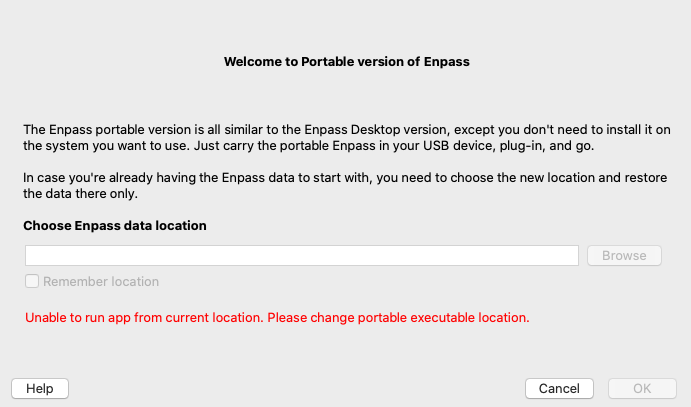
  3. Dear Community, I can not choose the data location on my MacBook macOS Catalina 10.15.7. Because the "browse button" is greyed out, see the attached screenshot. What else can I do??? Thank you for your help in advance.
Account

Navigation

Search

Search

Configure browser push notifications

Chrome (Android)
  1. Tap the lock icon next to the address bar.
  2. Tap Permissions → Notifications.
  3. Adjust your preference.
Chrome (Desktop)
  1. Click the padlock icon in the address bar.
  2. Select Site settings.
  3. Find Notifications and adjust your preference.