

Skip to content
View in the app

A better way to browse. Learn more.

Enpass Discussion Forum

A full-screen app on your home screen with push notifications, badges and more.

To install this app on iOS and iPadOS
  1. Tap the Share icon in Safari
  2. Scroll the menu and tap Add to Home Screen.
  3. Tap Add in the top-right corner.
To install this app on Android
  1. Tap the 3-dot menu (⋮) in the top-right corner of the browser.
  2. Tap Add to Home screen or Install app.
  3. Confirm by tapping Install.

hk_2906

Members
  • Joined

  • Last visited

Everything posted by hk_2906

  1. Thanks for the reply Gulshan. So you're saying the ctrl+/ shortcut is being handled by Firefox?
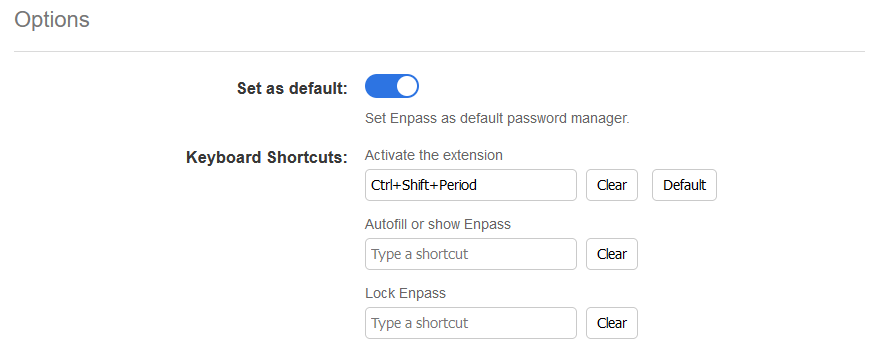
  2. Hi, I'm running Enpass on Windows 10, using the current version on the Microsoft store. I've got the firefox extension installed, and my keyboard shortcuts setup as seen in my attached screenshot. Whenever I'm editing code in firefox, trying to use the comment shortcut (ctrl+/) also opens a new tab with the enpass firefox settings (the same page I shared the screenshot from). I can't find any shorcut settings that seem to be set to ctrl+/ in either firefox or Enpass, and I'm at a loss as to what to do, this is an important keyboard shortcut for me, and I'd rather not have enpass taking it over. Any help would be appreciated.
Account

Navigation

Search

Search

Configure browser push notifications

Chrome (Android)
  1. Tap the lock icon next to the address bar.
  2. Tap Permissions → Notifications.
  3. Adjust your preference.
Chrome (Desktop)
  1. Click the padlock icon in the address bar.
  2. Select Site settings.
  3. Find Notifications and adjust your preference.