troypulk1
Members
-
Joined
-
Last visited
Everything posted by troypulk1
-
-
I followed the above instructions and I have x11 echo $XDG_SESSION_TYPE x11 I uninstalled Enpass first. $ sudo -i $ echo "deb https://apt.enpass.io/ x11 main" | sudo tee /etc/apt/sources.list.d/enpass.sources And import key that is used to sign the release: $ wget -O - https://apt.enpass.io/keys/enpass-linux.key | sudo tee /etc/apt/trusted.gpg.d/enpass.asc After that, you can install Enpass as any other software package: $ apt-get update $ apt-get install enpass $ exit But I still get the following error $ /opt/enpass/Enpass Failed to create wl_display (No such file or directory) qt.qpa.plugin: Could not load the Qt platform plugin "wayland" in "" even though it was found. This application failed to start because no Qt platform plugin could be initialized. Reinstalling the application may fix this problem. Available platform plugins are: wayland-egl, wayland. Aborted
-
I didn't realize that the repository had a cache and older programs are there. I use debian so it's apt-cache showpkg enpass. Thanks
-
-
Same here, please update. Get:16 https://apt.enpass.io stable Release.gpg [1,321 B] Err:16 https://apt.enpass.io stable Release.gpg Sub-process /usr/bin/sqv returned an error code (1), error message is: Missing key B6DA722E2E65721AF54B93966F7565879798C2FC, which is needed to verify signature. Fetched 51.4 kB in 1s (72.4 kB/s) Reading package lists... Done W: An error occurred during the signature verification. The repository is not updated and the previous index files will be used. OpenPGP signature verification failed: https://apt.enpass.io stable Release: Sub-process /usr/bin/sqv returned an error code (1), error message is: Missing key B6DA722E2E65721AF54B93966F7565879798C2FC, which is needed to verify signature. W: Failed to fetch https://apt.enpass.io/dists/stable/Release.gpg Sub-process /usr/bin/sqv returned an error code (1), error message is: Missing key B6DA722E2E65721AF54B93966F7565879798C2FC, which is needed to verify signature.
-
I got this message, $ sudo apt-get update Get:8 https://apt.enpass.io stable Release [6,621 B] Get:9 https://apt.enpass.io stable Release.gpg [1,321 B] Ign:9 https://apt.enpass.io stable Release.gpg Reading package lists... Done W: OpenPGP signature verification failed: https://apt.enpass.io stable Release: Sub-process /usr/bin/sqv returned an error code (1), error message is: Missing key F433834B65BE665BCE974660877653760D0214BC, which is needed to verify signature. E: The repository 'https://apt.enpass.io stable Release' is no longer signed. N: Updating from such a repository can't be done securely, and is therefore disabled by default. N: See apt-secure(8) manpage for repository creation and user configuration details. Will I have too install the new one manually or do you think it can be updated with apt-get?
-
After 2026-02-01T00:00:00Z Enpass Linux Version 6.11.12 (1953) will no longer be secure / work properly. YOU HAVE 1 MORE DAY!!
-
Hello, how do I fix this? Thanks /etc/apt/sources.list.d/enpass.sources Types: deb URIs: https://apt.enpass.io/ Suites: stable Components: main Signed-By: /etc/apt/trusted.gpg.d/enpass.gpg Warning: https://apt.enpass.io/dists/stable/InRelease: Policy will reject signature within a year, see --audit for details Audit: https://apt.enpass.io/dists/stable/InRelease: Sub-process /usr/bin/sqv returned an error code (1), error message is: Signing key on B6DA722E2E65721AF54B93966F7565879798C2FC is not bound: No binding signature at time 2025-01-06T06:23:46Z because: Policy rejected non-revocation signature (PositiveCertification) requiring second pre-image resistance because: SHA1 is not considered secure since 2026-02-01T00:00:00Z
-
Thanks, This did not work as well.
-
Is there an update to this? This still doesn't work in the latest Vivaldi for Android.
-
As an update this bug started with Enpass v6-7-1-572
-
I too would like an .apk file. Will Enpass ever have a direct link for downloads? Thanks
-
Thank you for the update.
-
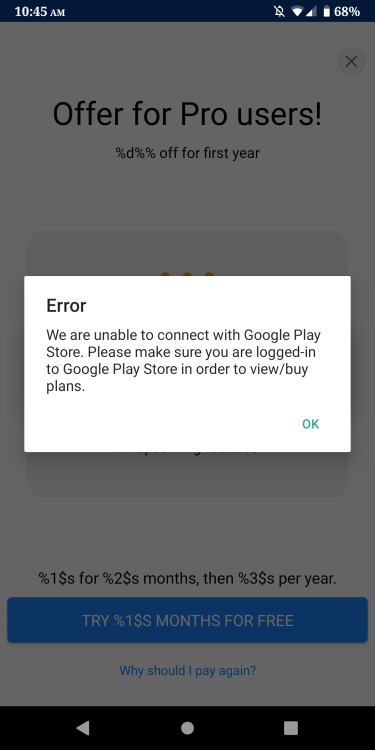
Thanks, That doesn't work because of this picture. As soon as I tap OK it goes back to the audit screen. Plus I just realized that it will not show me the web sites unless I pay for it and without Google services it will not work. Is there a way to see the web sites but not use the service? Thanks
-
Hello, I'm using version Enpass 6.8.1.658 In the Password audit section I have 28 supported 2FA web sites. I do not have Google services installed, is there a way to see which web sites these are? Thanks

-
Thanks, I stated in my prior post that the Enpass app Battery setting is not optimized. You said: "a full time PIN unlock behavior where Enpass will never ask you for Master password even if killed by OS." This thought is incorrect, my thought is that the PIN setting should work as advertised but it's not functioning correctly because the Enpass app is getting reset for some reason when it should not. I'm trying to figure out why the app is resetting. What would cause the OS to kill the app besides memory usage? What settings should I look at? This is not an issue: When too many apps are active in device background (in this case OS automatically kills some apps to claim memory). Thanks again
-
As an update: I installed Enpass 6.8.1.658 on a OnePlus One Android 9 LinageOS 16 The same issue happens with the same settings. If I remember right I installed Enpass 6.8.1.658 from APKmirror and the same issue happened as well.
-
Thanks, I have these set to Lock on Leaving is unchecked Lock after 10 minutes The permissions are set to just Files and media which is default Not to display over other apps (I've tried both ways it doesn't matter) The Battery is not optimized I also have a PIN set The PIN works but like I said the master PW is required after some times 30 minutes to 3 hours. Does Enpass have an internal setting that is not changeable to reset after a period of time?
-
Enpass 6.8.1.658 requires master password every few hours. This has been happening since 6.7 I've turned off all the apps and checked the battery and permissions settings. This does not happen with the APK mirror 6.7 version. What else could be causing the app to reset? OnePlus 5T Android 11 LinageOS 18.1-20220503-Nightly-dumpling
-
This issue is solved in the new version 6.8.1.658 Thank you P.S. I don't like the new look, I prefer the last look in 6.7
-
Enpass 6.8.0.648 crashes Android 11 LinageOS 18.1-20220503-Nightly-dumpling. Cannot reproduce because as soon as it tries to open it crashes. My last version Enpass 6.7.1.572 worked just fine. Where can I find the Enpass 6.7.1.572 APK so I can have a working password manager? Thanks