FlashBytes
Members
-
Joined
-
Last visited
-
Update: found the cause and a fix So, no key rotation or anything dramatic. The repo metadata is signed with Enpass' RPM signing key and that is the same key since 2018. The problem is that the repo tells zypper nothing about where to find it. zypper looks for the key at the usual location (https://yum.enpass.io/stable/x86_64/repodata/repomd.xml.key), that URL is 404, the .repo file has no gpgkey= line either, and if you never ran the manual rpm --import from the old install instructions, the refresh dies with the "unknown key 29CD5AFE005874D6" error. Also worth saying: my instinct to not just continue with an unknown key was right, keep doing that. This is the update channel for a password manager after all. Here is the verified way out: # get the key from the URL in Enpass' official openSUSE instructions curl -sL https://yum.enpass.io/RPM-GPG-KEY-enpass-signing-key -o /tmp/enpass-key.asc # check it BEFORE importing, that is the important part gpg --show-keys /tmp/enpass-key.ascFor me that prints: pub rsa2048 2018-08-30 [SC] 790870E4E1AD38252092696D29CD5AFE005874D6 uid Enpass RPM Signing Key <support@enpass.io> sub rsa2048 2018-08-30 [E]The last 16 hex chars of the fingerprint have to match the key id zypper complained about (29CD5AFE005874D6) and the uid should say Enpass. If that checks out: sudo rpm --import /tmp/enpass-key.asc sudo zypper ref EnpassInstalled Enpass keeps working the whole time, this only blocks the repo refresh. While I was at it I made the trust setup explicit in /etc/zypp/repos.d/Enpass.repo, since the shipped file has no GPG settings at all: gpgcheck=1 repo_gpgcheck=1 gpgkey=https://yum.enpass.io/RPM-GPG-KEY-enpass-signing-keyand on current Tumbleweed zypper there is also sudo zypper mr --gpgcheck-strict Enpass if you want every single rpm from that repo signature-checked, not just checked against checksums from the metadata. zypper lr Enpass then shows "GPG Check: (rp) Yes" and you are done. What Enpass should really improve: Serve the key at the location zypper probes (that repomd.xml.key URL). It is 404 right now, that is why the key never gets auto-imported and everyone ends up here. Ship the repo definition with GPG settings (gpgcheck, repo_gpgcheck, gpgkey=). The current openSUSE instructions add the repo with zypper ar, which lands a file with no GPG settings at all - mine had exactly five lines: enabled, autorefresh, baseurl, type, keeppackages. The only thing standing between a user and this error is a manual rpm --import step. While you are at it: the openSUSE instructions are still labeled "For openSUSE 42.3 & 15.0". Those versions are long dead, and nothing in the docs mentions how any of this should work on current openSUSE with today's zypper defaults. Also, the old install guide at enpass.io/support/kb/... now 404s without a redirect, and old forum posts still point to it.
-
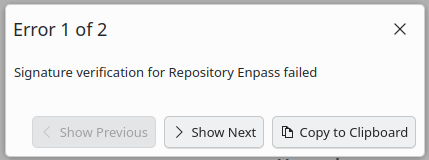
Since yesterday whenever Discover looks for updates, it gives me this message twice: "Signature verification for Repository Enpass failed" I'm on openSUSE Tumbleweed 20260912 with KDE Plasma 6.7.5 Qt 6.11.2 Kernel 7.2.4-1-default Graphics: Wayland and enpass-6.11.12 sudo zypper se -s enpassgives me this Looking for gpg keys in repository Enpass. gpgkey=https://yum.enpass.io/stable/x86_64/repodata/repomd.xml.key Repository Enpass does not define 'gpgkey=' URLs. Looking for gpg keys in repository Enpass. gpgkey=https://yum.enpass.io/stable/x86_64/repodata/repomd.xml.key Warning: File 'repomd.xml' from repository 'Enpass' is signed with an unknown key '29CD5AFE005874D6'. Note: Signing data enables the recipient to verify that no modifications occurred after the data were signed. Accepting data with no, wrong or unknown signature can lead to a corrupted system and in extreme cases even to a system compromise. Note: File 'repomd.xml' is the repositories master index file. It ensures the integrity of the whole repo. Warning: We can't verify that no one meddled with this file, so it might not be trustworthy anymore! You should not continue unless you know it's safe. File 'repomd.xml' from repository 'Enpass' is signed with an unknown key '29CD5AFE005874D6'. Continue? [yes/no] (no): Retrieving repository 'Enpass' metadata ....................................................................................[error] Repository 'Enpass' is invalid. [Enpass|https://yum.enpass.io/stable/x86_64/] Failed to retrieve new repository metadata. History: - Signature verification failed for repomd.xml Please check if the URIs defined for this repository are pointing to a valid repository. Warning: Skipping repository 'Enpass' because of the above error. What could be the issue? My instinct is to not just nilly willy continue with an unknown key.