

Skip to content
View in the app

A better way to browse. Learn more.

Enpass Discussion Forum

A full-screen app on your home screen with push notifications, badges and more.

To install this app on iOS and iPadOS
  1. Tap the Share icon in Safari
  2. Scroll the menu and tap Add to Home Screen.
  3. Tap Add in the top-right corner.
To install this app on Android
  1. Tap the 3-dot menu (⋮) in the top-right corner of the browser.
  2. Tap Add to Home screen or Install app.
  3. Confirm by tapping Install.

jcalonso

Members
  • Joined

  • Last visited

Everything posted by jcalonso

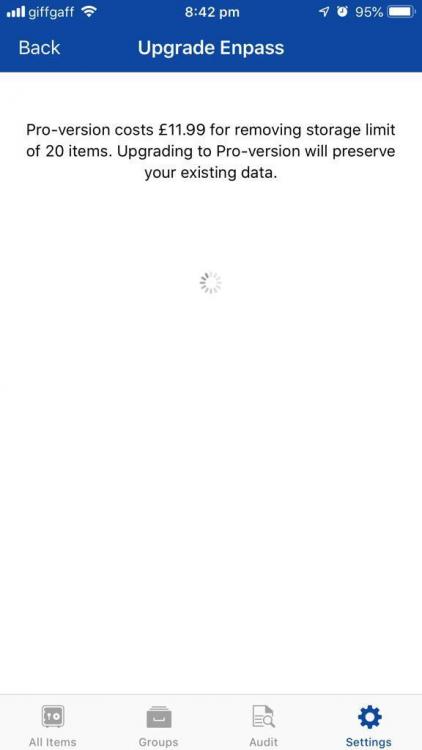
  1. In a fresh installation, after pressing the restore purchase button the app gets stuck showing the loading gif and nothing happens. iPhone 6 plus iOS 12.1.4 Enpass version: 6.0.4 (222)
  2. Hi! I just installed the Chrome and Firefox extensions on Arch Linux with i3wm, the first time I clicked on the icon it asked to authorize from the Enpass app, after doing that, if I click on the Enpass icon in the browser it wont show anything. I tried on Mac and it works perfect so I assume there is an issue showing the modal window, I read comments of people having issues with multi-monitor setups on Linux. I will keep investigating, if someone has any suggestions let me know. Thanks!

Account

Navigation

Search

Search

Configure browser push notifications

Chrome (Android)
  1. Tap the lock icon next to the address bar.
  2. Tap Permissions → Notifications.
  3. Adjust your preference.
Chrome (Desktop)
  1. Click the padlock icon in the address bar.
  2. Select Site settings.
  3. Find Notifications and adjust your preference.