


kobe_highlander
Members
-
Joined
-
Last visited
Everything posted by kobe_highlander
-
Sorry, just read it now and thanks for the reply: Enpass Version: 6.9.5 (1639) OS: Windows 11 Pro / 23H2 / 22631.3296 / Windows Feature Experience Pack 1000.22687.1000.0 I'll be looking into the curl Errror
-
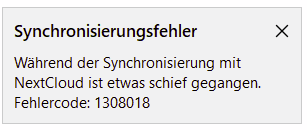
Just realised the error showed again. See screen shot ... literally translated: "Something went wrong while synchronising with NextCloud. Error Code 1308018."
-
Hi, I recently set-up a new Nextcloud Server (Virtualised on-top of Proxmox) and moved my instance form my old QNAP. Every now and then Enpass Sync produces the Error message 1308018. I could not find anything with regard to this number on the internet, hence me trying here. More Details: Nextcloud runs in a VM based on Fedora Server NextCloud Storage (where the Enpass Sync Vault resides) is NFS mounted from a TrueNAS Server using AD Kerberos Security I use Enpass on multiple clients but experience this error only but all on Windows clients The fun part is, that syncing is generally working but from time to time the error message is thrown As murphy is still alive and well, I cannot reproduce the correct message text as I writhe this ... I had it just an hour ago I'll update the correct message, albeit in German, as soon as I see it again. When the error is thrown it usually disappears after some time or after manually re-syncing, sometimes once, but sometimes only after a couple of re-tries. Enpass and Nextcloud are the most recent versions There is no error/warning in the Nextcloud Logs (Setting set to ... I've yet to triy with debug settings 1) Error never showed up when using NextCloud on QNAP I do suspect, given the symptoms, a Nextcloud, TrueNAS issue Any hint, what 1308018 stands for, so I could narrow down the search? Anyone with the same problem Usually there is at least something to be found on the net, but this error seams very specific. I usually get hits for 1307018 note the "7" instead of the "8". Thanks in advance ... any hint welcome